
Zero Trust Security for Canadian SMBs: A Practical Implementation Guide
Written by Mike Pearlstein, CISSP — CEO of Fusion Computing Limited. Helping Canadian businesses build and manage secure IT infrastructure since 2012 across Toronto, Hamilton, and Metro Vancouver.
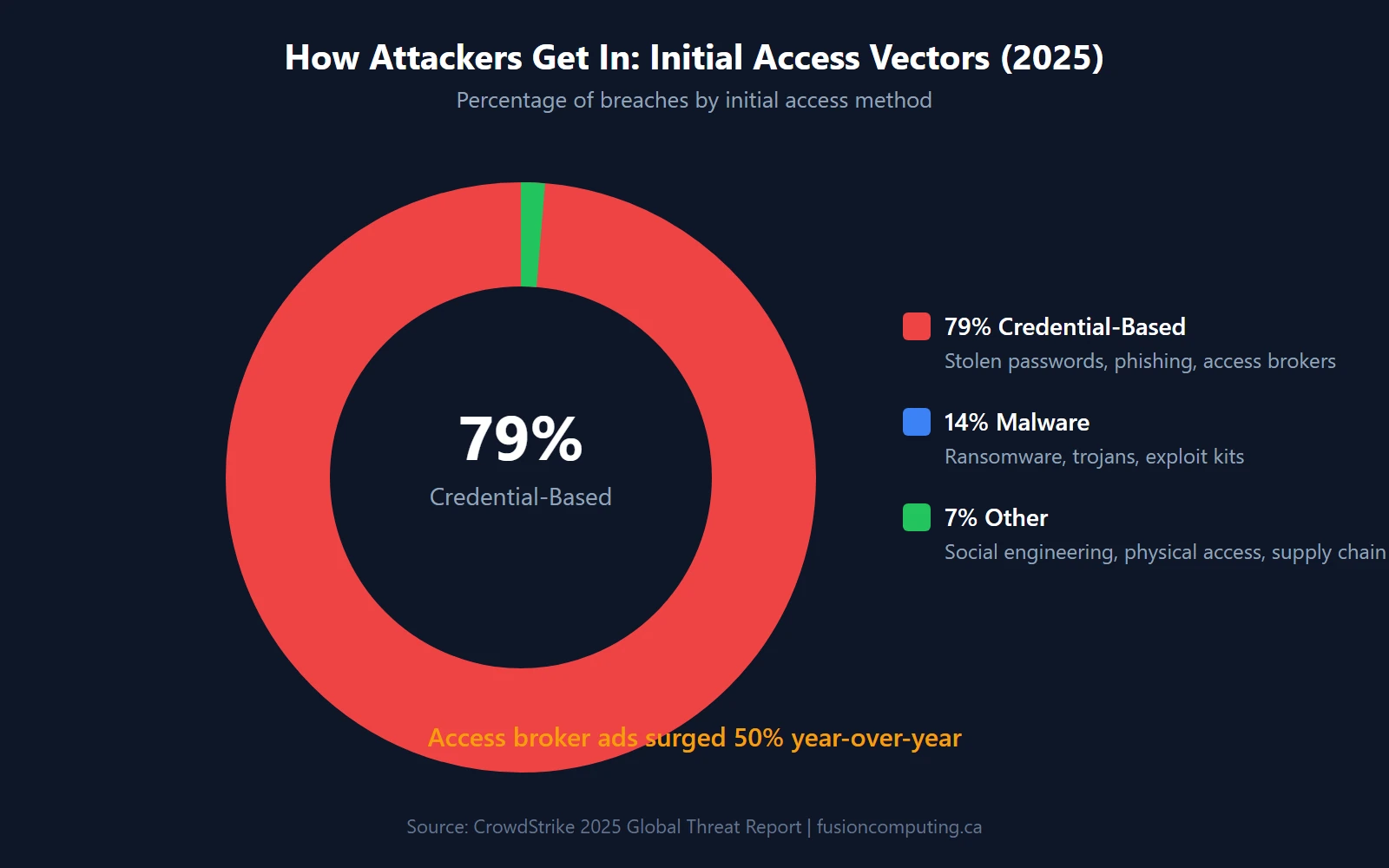
Seventy-nine percent of attacks that breach an organization now bypass malware entirely — they walk in through stolen credentials, according to CrowdStrike’s 2025 Global Threat Report. Your firewall didn’t fail. Your perimeter didn’t collapse. An attacker logged in with a legitimate username and password, and your security stack said “welcome back.”
That’s the problem zero trust solves. This guide covers what zero trust actually means for a 20–200 person Canadian business, what it costs in real dollars, and how to implement it without enterprise-grade budgets or a 50-person security team.
Key Takeaways
- 63% of organizations have implemented zero trust, but only 4% have mature deployments — most are stuck in partial rollout (Gartner / Cisco 2024–2025)
- Canadian data breaches cost an average of CA$6.32 million per incident. Organizations using AI-driven security automation save $2.2 million per breach (IBM 2024)
- 79% of initial-access attacks are credential-based, making identity verification the highest-priority zero trust pillar (CrowdStrike 2025)
- 65% of enterprises plan to replace their VPN with ZTNA within 12 months — 56% experienced VPN-related breaches in 2024 (Zscaler 2025)
- Implementation starts with MFA, which blocks 99.2% of account compromises (Microsoft 2024), then scales through endpoint trust, micro-segmentation, and continuous monitoring
What Is Zero Trust Security?
Zero trust security is a framework built on the principle “never trust, always verify.” It requires authentication and authorization for every user, device, and network connection before granting access to any resource. Core components include multi-factor authentication (MFA), network micro-segmentation, least-privilege access controls, continuous monitoring, and encryption of all data.
TL;DR
Zero trust security is a cybersecurity framework that requires verification for every user, device, and connection—regardless of whether they’re inside or outside the network. For Canadian SMBs, zero trust means: verify identity with MFA on every access request, segment networks to limit lateral movement, encrypt all data in transit and at rest, and continuously monitor for anomalous behavior.
Zero trust is a security architecture where no user, device, or network connection is trusted by default — every access request is verified continuously, regardless of whether it originates inside or outside the corporate network. It’s been formalized by NIST Special Publication 800-207 and has moved from theory to standard practice. According to Gartner’s 2024 survey, 63% of organizations worldwide have fully or partially implemented a zero trust strategy.
But here’s the gap that matters: Cisco’s 2025 Cybersecurity Readiness Index found that only 4% of organizations have reached “Mature” readiness, while 71% fall in the two least-prepared categories. Most companies started zero trust. Almost none have finished it.
How Zero Trust Differs from Perimeter-Based Security
Traditional security works like a castle with a moat. Once you’re past the gate (your firewall, your VPN), you’re trusted. You can move freely between servers, applications, and data stores. That model assumed threats were outside and employees were inside. It doesn’t work anymore.
That assumption is dead. Remote work, SaaS applications, and cloud infrastructure mean there’s no “inside” anymore. Zero trust replaces the moat with checkpoints at every door. Every request — open a file, access an application, connect to a server — requires proof of identity and device health. Every time.
The Five Pillars of Zero Trust
NIST SP 800-207 structures zero trust around five pillars that work together:
- Identity — Verify who is requesting access through multi-factor authentication and conditional access policies
- Device — Confirm the requesting device meets compliance requirements through endpoint detection and response and device health checks
- Network — Segment access so a breach in one area can’t spread laterally through next-generation firewall rules and micro-segmentation
- Application — Enforce least-privilege access at the application layer, not just the network layer
- Data — Classify, encrypt, and control data access based on sensitivity and user authorization, aligned with data security compliance requirements
Why Are Canadian Small Businesses Adopting Zero Trust?
Three forces are converging on Canadian SMBs at the same time: ransomware growth that shows no sign of slowing, cyber insurance carriers tightening requirements, and new federal legislation raising the compliance bar. Any one of these would be enough to rethink your security architecture. Together, they make zero trust less of a choice and more of a business requirement.
The Canadian Threat Landscape
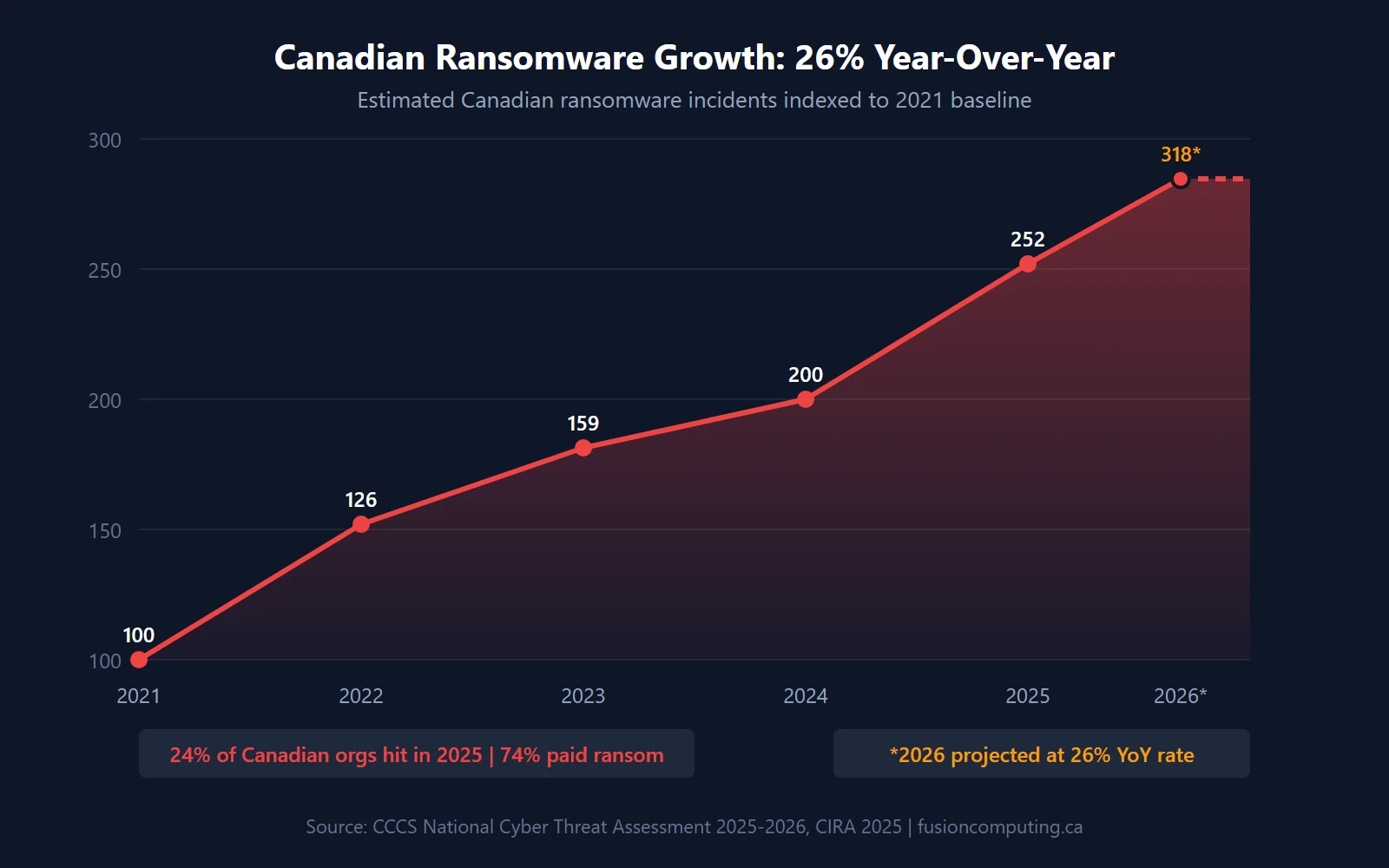
The numbers are blunt. Canada’s National Cyber Threat Assessment 2025–2026 from the Canadian Centre for Cyber Security reports ransomware incidents grew an average of 26% year-over-year from 2021 to 2024, with the average ransom payment in Canada reaching $1.13 million in 2023. Meanwhile, CIRA’s 2025 Cybersecurity Survey found that 24% of Canadian organizations were ransomware victims in the past 12 months — and 74% of those paid the ransom.
That’s nearly one in four Canadian businesses getting hit. And three-quarters of them paying.
The cost goes beyond the ransom itself. IBM’s 2024 Cost of a Data Breach report puts the average Canadian breach at CA$6.32 million when you include downtime, legal costs, customer notification, and reputational damage. For a 50-person company, that’s an existential event. (We’ve seen two clients in the past year face exactly this scenario — one survived because they had an incident response plan in place. The other didn’t.)
Cyber Insurance Is Forcing the Issue
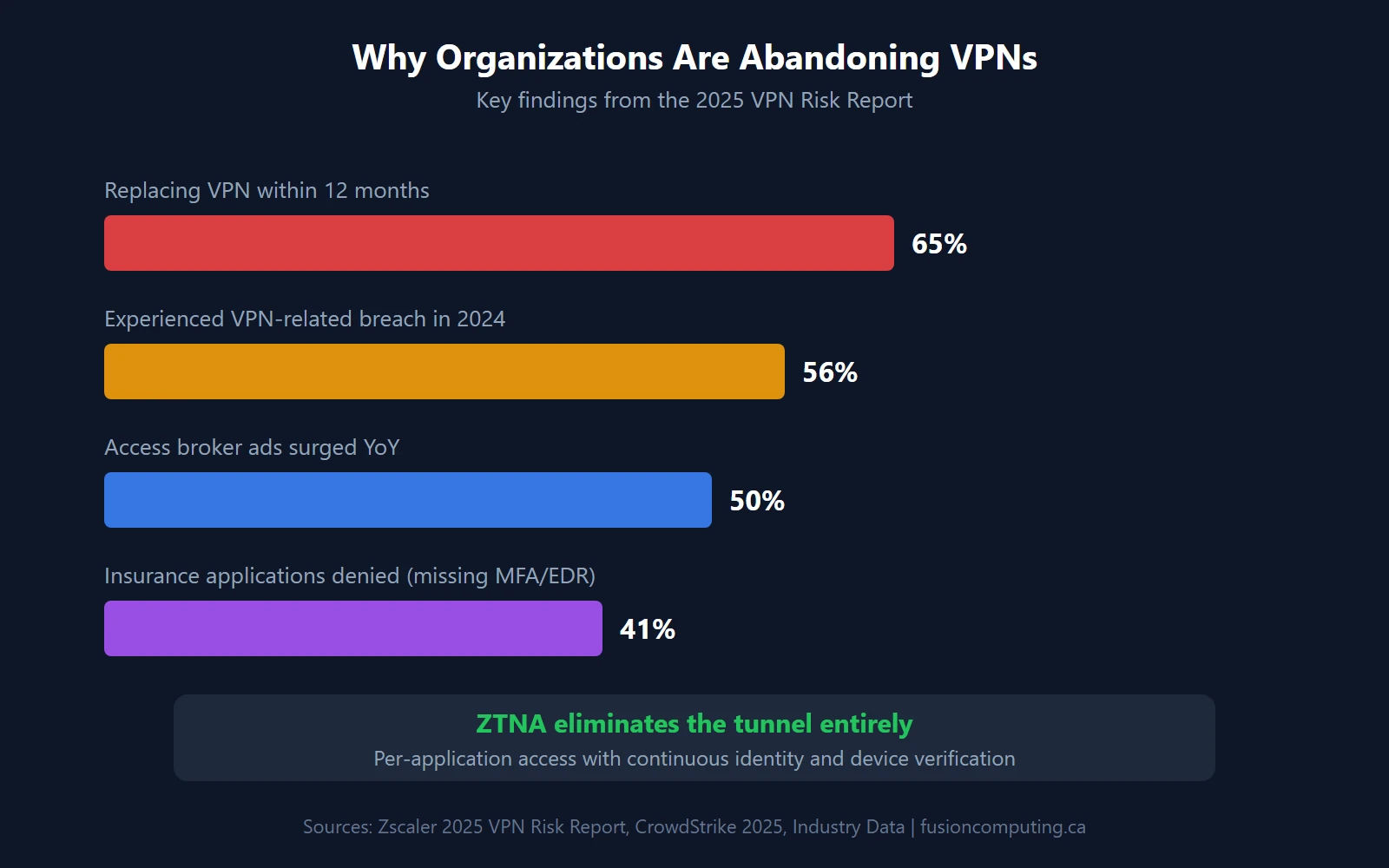
Cyber insurance carriers aren’t just raising premiums. They’re gatekeeping coverage behind specific security controls. Industry data from 2024 shows that 80% of cyber insurers now require MFA as a baseline condition, and 41% of applications are denied on first submission — the top reason being missing MFA and endpoint protection. If you can’t demonstrate zero trust fundamentals, you can’t get insured. (For a full breakdown of what carriers expect, see our cyber insurance requirements checklist.)
Canada’s Bill C-8 adds regulatory pressure by requiring critical infrastructure operators to implement cybersecurity programs and report incidents. Even if your business isn’t classified as critical infrastructure, your clients and partners won’t care — they’ll expect the same controls.
Get a Custom IT Assessment for Your Business
What Does ZTNA Replace?
Zero Trust Network Access (ZTNA) replaces the traditional VPN — and the replacement is accelerating. Zscaler’s 2025 VPN Risk Report found that 65% of enterprises plan to replace their VPN within the next 12 months. The reason: 56% of organizations experienced a VPN-related breach in 2024. VPNs grant broad network access after a single authentication event. ZTNA grants access to specific applications only, after verifying identity, device compliance, and context — every single time.
ZTNA vs. VPN: A Head-to-Head Comparison
| Feature | Traditional VPN | ZTNA |
|---|---|---|
| Trust model | Trust after initial login | Verify every request, every time |
| Attack surface | Entire network exposed | Only authorized applications visible |
| Lateral movement | Unrestricted once connected | Blocked by micro-segmentation |
| Remote performance | Backhauled through HQ — slow | Direct-to-cloud — fast |
| Scalability | Hardware-dependent, capacity limits | Cloud-native, scales with users |
| Visibility | Limited session logging | Full per-request audit trail |
| Cost model | CapEx hardware + licensing | OpEx per-user subscription |
The difference isn’t incremental. VPN security assumes that anyone inside the tunnel is safe. That assumption is exactly what credential-based attacks exploit. ZTNA eliminates the tunnel entirely.
How Do You Implement Zero Trust in a Small Business?
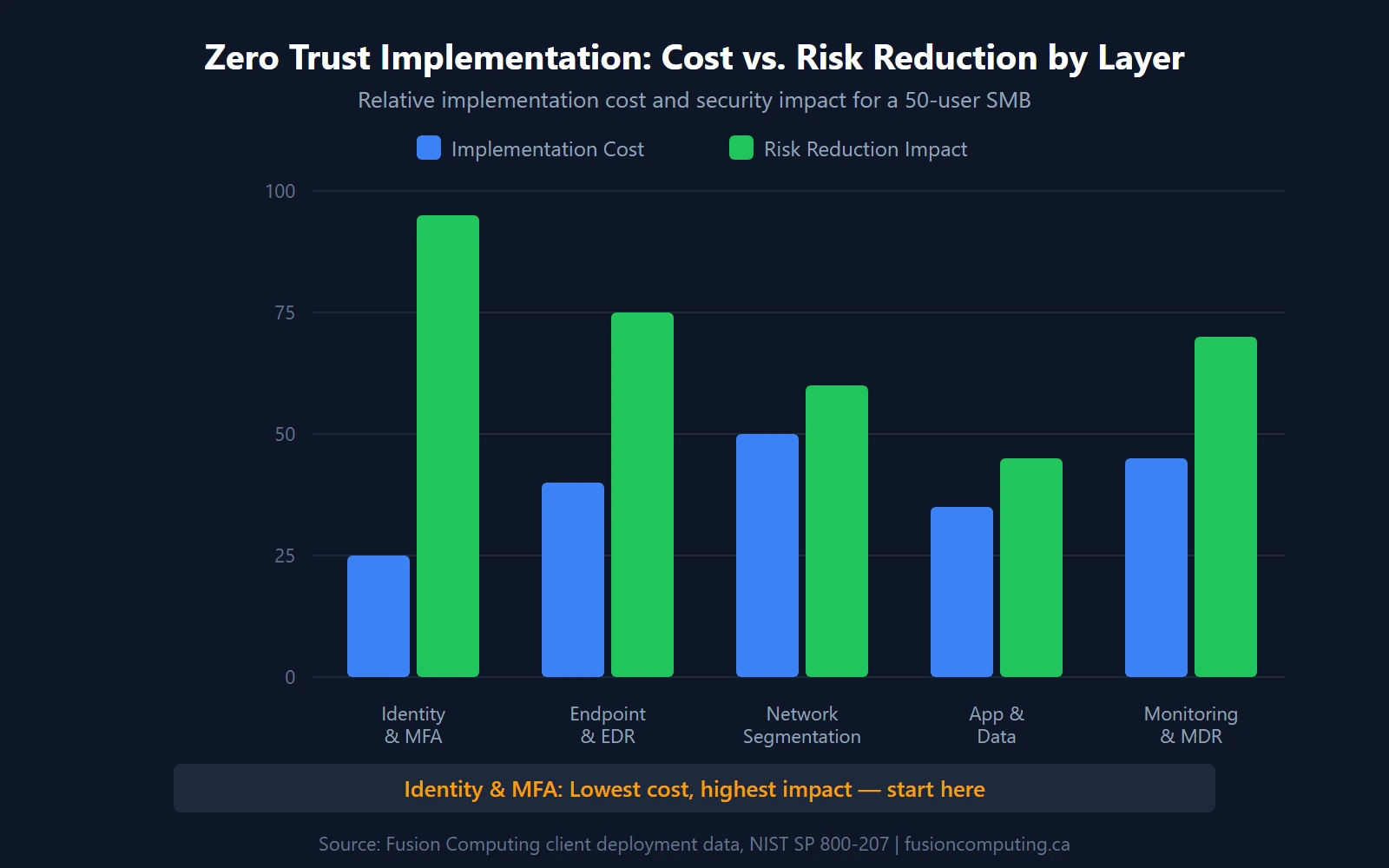
Implementation follows five layers, each building on the last. Start with identity — it’s the highest-impact, lowest-cost layer. Microsoft’s 2024 Digital Defense Report found that MFA blocks more than 99.2% of account compromise attacks, making it the single most effective security control you can deploy. Then scale outward through device trust, network segmentation, application controls, and continuous monitoring.
Layer 1: Identity and MFA
Every zero trust deployment starts here. Enable MFA on every account — no exceptions, no “we’ll get to it later.” Deploy conditional access policies through Microsoft Entra ID (included with Microsoft 365 Business Premium) to enforce access rules based on user identity, device compliance, location, and risk level. Eliminate shared accounts and local admin rights. Okta’s 2025 data shows 70% of workforce users now use MFA, with phishing-resistant authenticator adoption growing 63% year-over-year. If you’re not in that 70%, you’re behind the curve.
Layer 2: Endpoint Detection and Device Trust
MFA verifies the person. Endpoint detection verifies the device. Deploy an EDR platform (CrowdStrike Falcon, Microsoft Defender for Endpoint, or SentinelOne) on every laptop, desktop, and mobile device that touches company data. Set device compliance policies: encrypted disk, current OS patches, active EDR agent. If a device doesn’t meet those conditions, it doesn’t get access. It’s that simple. (We routinely find clients with 15–20% of their fleet failing basic compliance checks when we run the first audit.)
Layer 3: Network Micro-Segmentation
A flat network is an attacker’s playground. Once they’re in, there’s nothing stopping them from reaching everything. Micro-segmentation divides your network into isolated zones: production servers in one segment, employee workstations in another, IoT devices in a third, guest WiFi completely isolated. Use VLANs and next-generation firewall rules to control east-west traffic between segments. This isn’t new tech — it’s applying existing tools with zero trust intent. A network security assessment identifies where your current segmentation gaps are.
Layer 4: Application and Data Protection
Apply least-privilege access at the application layer. Users should only access the applications and data they need for their specific role — nothing more. Use Microsoft 365 Data Loss Prevention (DLP) policies, Azure Information Protection labels, and application-level access controls. You’ll want to classify data by sensitivity: public, internal, confidential, restricted. Each classification gets different access rules, encryption requirements, and sharing restrictions aligned with PIPEDA compliance standards.
Layer 5: Continuous Monitoring and MDR
Zero trust isn’t a project you finish. It’s an architecture you monitor continuously. Deploy a managed detection and response service that provides 24/7 threat monitoring, automated response playbooks, and human analyst escalation. An MSSP can run this for a fraction of the cost of building an in-house security operations centre. The goal: detect credential misuse, anomalous access patterns, and policy violations in minutes, not days.
How Much Does Zero Trust Cost for a Canadian Small Business?
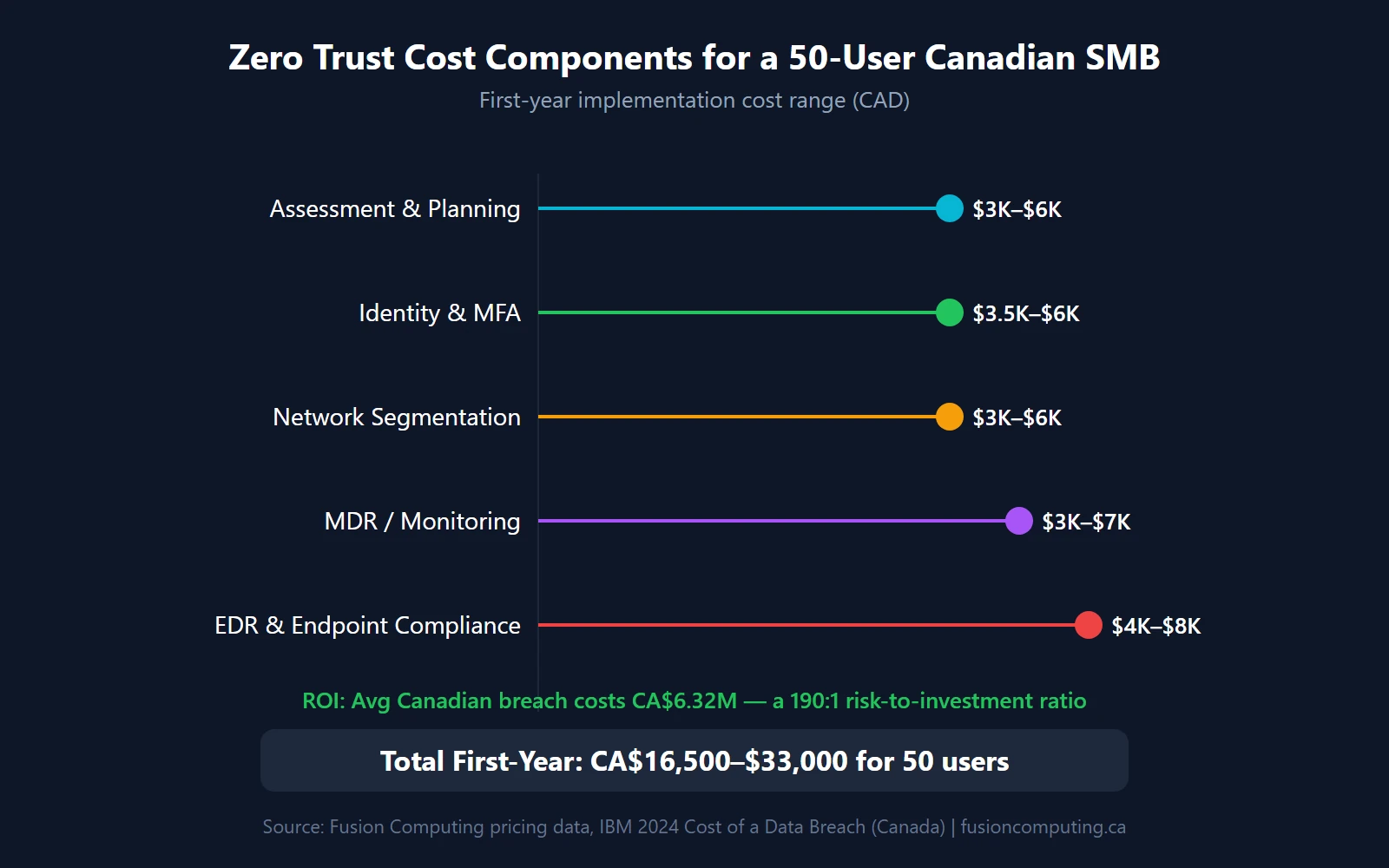
For a 50-user Canadian SMB, expect CA$15,000–$40,000 in first-year implementation costs (assessment, configuration, policy setup) plus CA$180–$250/user/month for ongoing managed IT and security services. That’s a real investment. But the alternative is real too: IBM’s 2024 data shows organizations using AI and security automation save $2.2 million per breach compared to those without. The zero trust market itself is projected to grow from US$42.28 billion in 2025 to US$148.68 billion by 2034 (Fortune Business Insights), which tells you where the industry is heading.
| Zero Trust Layer | 25 Users | 50 Users | 100 Users | 200 Users |
|---|---|---|---|---|
| Identity & MFA (conditional access) | $2,000–$4,000 | $3,500–$6,000 | $5,000–$10,000 | $8,000–$15,000 |
| EDR & endpoint compliance | $2,500–$5,000 | $4,000–$8,000 | $7,000–$14,000 | $12,000–$25,000 |
| Network segmentation | $1,500–$3,000 | $3,000–$6,000 | $5,000–$12,000 | $10,000–$20,000 |
| MDR / continuous monitoring | $2,000–$4,000 | $3,000–$7,000 | $5,000–$12,000 | $10,000–$20,000 |
| Assessment & planning | $2,000–$4,000 | $3,000–$6,000 | $4,000–$8,000 | $6,000–$12,000 |
| Total first-year implementation | $10,000–$20,000 | $16,500–$33,000 | $26,000–$56,000 | $46,000–$92,000 |
These are implementation costs — the one-time work to assess, configure, and deploy. Ongoing managed IT and security costs run $180–$250/user/month and include monitoring, patching, help desk, and incident response. A co-managed IT arrangement where your internal team handles day-to-day operations while an MSP manages security runs $80–$150/user/month.
Is it worth it? Compare the implementation cost to a single breach. For a 50-user company, zero trust implementation costs roughly $16,500–$33,000. An average Canadian breach costs CA$6.32 million. That’s a 190:1 risk-to-investment ratio. Your IT budget should treat this as insurance, not discretionary spending.
Zero Trust Readiness: A Self-Assessment for Your Business
Where does your business stand today? Run through these ten items. Each one maps to a specific zero trust pillar, and each gap represents a concrete risk.
| # | Control | Pillar | In Place? |
|---|---|---|---|
| 1 | MFA enforced on every user account (no exceptions) | Identity | □ |
| 2 | Conditional access policies block logins from unknown devices and locations | Identity | □ |
| 3 | EDR deployed on 100% of endpoints (laptops, desktops, mobile devices) | Device | □ |
| 4 | Device compliance policies enforce encryption, patching, and agent health | Device | □ |
| 5 | Network segmented into isolated zones (production, workstations, IoT, guest) | Network | □ |
| 6 | East-west firewall rules restrict lateral movement between segments | Network | □ |
| 7 | Application access follows least-privilege (role-based, not blanket admin) | Application | □ |
| 8 | Sensitive data classified and protected with DLP and encryption policies | Data | □ |
| 9 | 24/7 security monitoring with automated alerting and response | Monitoring | □ |
| 10 | Documented incident response plan tested within the last 12 months | Monitoring | □ |
Scoring: Count your checkmarks. 8–10 means you’ve got a strong foundation — focus on maturity and automation. 5–7 means you’re partially there but have exploitable gaps. Under 5? You’re running on perimeter security in a zero-perimeter world. That’s where a cybersecurity assessment from a managed cybersecurity provider identifies exactly what to fix first.
If you checked fewer than 7 of those boxes, you’re not alone. That aligns with Cisco’s finding that 71% of organizations fall in the two least-prepared readiness categories. The good news: you don’t need to fix everything at once. Start with identity (items 1–2), move to endpoints (items 3–4), then tackle network and monitoring. A virtual CIO can help you prioritize the sequence based on your specific risk profile and budget.
Book a 30-Minute IT Assessment
Fusion Computing helps businesses implement zero trust security frameworks across
Toronto and the GTA,
Hamilton, and
Metro Vancouver.
Related Resources
- Cyber Insurance Coverage Checklist for Canadian Businesses
- Why Multi-Factor Authentication Matters for Your Business
- What Is Managed Detection and Response (MDR)?
- How to Build an Incident Response Plan for a Canadian Small Business
- IT Infrastructure Security Best Practices
- IT Budget Guide for Canadian Small Businesses
- AI-Powered Cyber Threats in 2026
- Security Vulnerability Assessment Guide
What is zero trust security in simple terms?
Zero trust is a security model where no user, device, or connection is trusted by default. Every access request must be verified through identity checks, device compliance validation, and continuous monitoring — regardless of whether the request comes from inside or outside the network. The core principle: never trust, always verify.
Do small businesses really need zero trust?
Yes. CrowdStrike’s 2025 data shows 79% of breaches use stolen credentials, not malware — meaning traditional antivirus and firewalls alone won’t stop them. Company size doesn’t determine your risk; your attack surface does. CIRA found 24% of Canadian organizations were hit by ransomware in 2025, and small businesses are disproportionately targeted because attackers know they have weaker controls.
How long does zero trust implementation take?
For a typical 50-user Canadian business, expect 4–6 months from initial assessment to full conditional access enforcement. The work is phased: identity and MFA in month one, endpoint detection in months two and three, network segmentation in months three and four, and continuous monitoring from month four onward. Larger organizations with complex infrastructure may take 9–12 months.
What is ZTNA and how is it different from VPN?
Zero Trust Network Access (ZTNA) grants access to specific applications after verifying identity and device compliance on every request. A VPN grants broad network access after a single login. ZTNA eliminates the attack surface that VPNs expose — which is why 65% of enterprises plan to replace their VPN with ZTNA within 12 months, according to Zscaler’s 2025 VPN Risk Report.
How much does zero trust cost for a small business?
First-year implementation costs range from CA$10,000 for a 25-user company to CA$92,000 for a 200-user organization, covering assessment, MFA, EDR, network segmentation, and monitoring setup. Ongoing managed security runs CA$180–$250/user/month. Co-managed arrangements where your internal IT handles operations and an MSP manages security start at $80–$150/user/month.
Does zero trust help with cyber insurance requirements?
Directly. Industry data shows 80% of cyber insurers now require MFA, and 41% of applications are denied on first submission — primarily because of missing MFA and endpoint protection. Implementing zero trust gives you the controls carriers are looking for: MFA, EDR, network segmentation, and incident response plans. Several of our clients have seen their renewal premiums stabilize after deploying these controls.
Can you implement zero trust with Microsoft 365?
Partially. Microsoft 365 Business Premium and E3/E5 include conditional access, MFA, Microsoft Defender for Endpoint, and Intune for device compliance — covering the identity and endpoint pillars. You still need network micro-segmentation (firewall and VLAN configuration), data classification policies, and 24/7 monitoring through an MDR provider to cover all five pillars.


