
Short answer: A realistic IT budget for small business in Canada is 4 to 7% of annual revenue in 2026, or roughly CA$325 to CA$425 per employee per month for operational technology spend. Regulated sectors (finance, healthcare, legal) land closer to 7 to 10%. Gartner’s SMB average sits at 6.9%, versus 4.3% for enterprises. Full breakdown by company size below.
Canadian SMB IT budget benchmarks: by the numbers
Canadian SMB IT budgets in 2026 cluster around a handful of hard numbers. Gartner IT Key Metrics Data puts SMB IT spend at 6.9% of revenue versus 4.3% for enterprises, IBM pegs the average Canadian breach at CA$6.98 million, and Cledara measured SaaS spend per employee at US$4,830. The stat cards below hold the figures I quote most in budget reviews.
Benchmark your per-user IT spend against current Canadian SMB rates and see where you stand. A few quick questions.
Run the IT cost calculator →or book a free 30-min call →Free · no email until you see your score, or talk to a senior engineer.
At Fusion Computing we treat budgeting and procurement as two halves of the same plan: the budget sets the envelope, procurement spends it well. See our companion guide to the IT procurement process and best practices.
A 50-person company is the most common size to run this budget against. Managed IT services for a 50-employee business breaks the same monthly number into eight service areas and the staffing pod behind them.
IT budget by company size: per-employee and per-user benchmarks
The table below summarizes typical Canadian SMB IT spend by employee count. Each band is a planning range that Fusion Computing recommends. Treat it as a guide for building your own number. Ranges are wider for smaller firms because fixed-cost spread is sharper at low headcount.
Swipe sideways for the full table →
| Company size | IT spend per employee per year | IT spend % of revenue | Cybersecurity share of IT |
|---|---|---|---|
| 1 to 10 employees | CA$8,400 to CA$13,200 | 6 to 9% | 15 to 18% |
| 11 to 25 employees | CA$7,200 to CA$11,400 | 5 to 8% | 15 to 20% |
| 26 to 50 employees | CA$6,000 to CA$10,200 | 4 to 7% | 18 to 22% |
| 51 to 100 employees | CA$5,400 to CA$9,000 | 4 to 6% | 18 to 25% |
| 101 to 200 employees | CA$4,800 to CA$8,400 | 3 to 5% | 20 to 25% |
Sources: IBM Cost of a Data Breach 2025; planning ranges recommended by Fusion Computing, 2026.
These numbers are planning ranges that Fusion Computing recommends, set beside the Gartner, IBM and Cledara figures cited in this guide. Your own invoices and licence stack are the real input.
“The pattern I see most often: 30-person Toronto professional-services firms set their IT budget at 3 percent of revenue, copying last year’s number. Then they absorb their first ransomware near-miss or cyber-insurance renewal denial. Within one quarter they double security spend, add EDR and MDR, and end up at 6 to 7 percent.”
“The cheaper move is to start at 6 percent with named line items for EDR, awareness training and incident response, then defend that allocation with a quarterly vCIO review. The expensive move is to underfund security until an underwriter or regulator forces the conversation.”
Mike Pearlstein holds the CISSP, the gold standard in cybersecurity certification. He is CEO of Fusion Computing and has led its managed IT and cybersecurity practice since 2012, serving businesses across Toronto, Hamilton and Metro Vancouver.
Canadian small businesses spend an average of 3 to 8 percent of annual revenue on IT in 2026.
Operationally, that runs CA$325 to CA$425 per employee per month across managed IT services, Microsoft 365 licensing, hardware amortization, connectivity and security tooling (see our managed IT services cost in Canada guide).
Fully loaded with annual capital projects (hardware refresh cycles, office moves, server replacements, growth initiatives), the total climbs to CA$500 to CA$800 per employee per month. Most owners don’t know whether they’re overspending on the wrong things or underspending in areas that leave them exposed.
In this guide I break down where your IT dollars should go in 2026. You get Canadian-specific benchmarks, real cost ranges and the same framework I use with clients to build a budget that protects and grows the business.
Most Canadian SMBs I meet set their IT budget reactively, copying last year’s number, reacting to an incident, or matching what a peer mentioned. The Gartner 4 to 7% benchmark describes what businesses actually spend, not what they need. The gap between those two figures is where the risk accumulates. GTA buyers comparing proposals can pressure-test their numbers against our published Toronto-based managed IT provider scope and pricing.
What does a typical small business IT budget look like in Canada?

Fusion Computing recommends Canadian SMBs allocate 4 to 7 percent of annual revenue to IT in 2026, with at least 15 percent of IT directed to cybersecurity. According to MedhaCloud’s 2026 SMB IT Spending Statistics (citing Gartner IT Key Metrics Data), SMBs average 6.9 percent of revenue on IT versus 4.3 percent for enterprises. A CA$5M SMB should plan CA$200,000 to CA$350,000 per year for infrastructure, licensing, support, security and strategy.
Swipe sideways for the full table →
| Annual revenue | 4% allocation | 7% allocation | Cybersecurity floor (15% of IT) |
|---|---|---|---|
| CA$2,000,000 | CA$80,000 | CA$140,000 | CA$12,000 to CA$21,000 |
| CA$5,000,000 | CA$200,000 | CA$350,000 | CA$30,000 to CA$52,500 |
| CA$10,000,000 | CA$400,000 | CA$700,000 | CA$60,000 to CA$105,000 |
| CA$25,000,000 | CA$1,000,000 | CA$1,750,000 | CA$150,000 to CA$262,500 |
A typical small business IT budget in Canada allocates 4 to 7% of annual revenue to technology. For a company with 50 employees, this translates to approximately CA$300,000 to CA$510,000 per year.
Key line items start with managed IT services, which market surveys put at CA$160 to CA$250 per user per month. The rest covers cybersecurity tools and monitoring, Microsoft 365 or Google Workspace licences, hardware refresh cycles, backup and disaster recovery, and a reserve for unplanned projects.
The 4 to 7% benchmark is where every IT budget conversation starts, and where most go sideways. The actual target depends on your industry, your compliance obligations and which of the six core categories you are currently underfunding. The percentage alone tells you nothing about where to cut or invest.
According to Gartner’s 2026 forecast, worldwide IT spending will reach US$6.15 trillion this year, up 10.8% from 2025, with SMB IT spending accounting for US$1.18 trillion of it and growing faster than enterprise IT.
Fusion Computing charges CA$185/user/month for fully managed IT services in Canada, covering 24/7 monitoring, help desk, cybersecurity, Microsoft 365 and backup. The company reports a 93% first-contact resolution rate with no per-incident surcharges.
For Canadian SMBs specifically, here are the benchmarks that matter:
Swipe sideways for the full table →
| Company Size | Annual Revenue | IT as % of Revenue | Approx. Annual IT Budget |
|---|---|---|---|
| 1 to 10 employees | Under CA$1M | 6 to 7% | CA$30,000 to CA$70,000 |
| 10 to 50 employees | CA$1M, CA$10M | 4 to 6% | CA$60,000 to CA$500,000 |
| 50 to 200 employees | CA$10M, CA$50M | 3 to 5% | CA$300,000 to CA$2M |
Smaller companies pay a proportionally higher “technology tax” because fixed costs like a firewall, backup system, or Microsoft 365 licensing don’t scale down linearly with headcount.
Why the percentage-of-revenue benchmark isn’t enough
Revenue percentage is a starting point, not an answer. A CA$5M accounting firm with 30 employees running entirely on cloud applications has different IT needs than a CA$5M construction company with field crews, shared tablets, and project management software. So what does 4 to 7% actually buy you? And more importantly, is it the right 4 to 7%?
Where should your IT budget go? The six core categories

The percentage-of-revenue model is a starting point, not an answer. Where the money is allocated tells you far more about risk exposure than the total, and most SMBs discover that gap only after an incident, not before it. In our practice the six categories below are where every dollar of a Canadian SMB IT budget lands, and the split matters more than the headline number.
Every IT budget, regardless of company size, breaks down into six categories. The percentages below are the split we recommend for 2026:
1. Cybersecurity (15 to 20% of IT budget)
This is the fastest-growing category. SMBs now allocate an average of 14.8% of their IT budget to cybersecurity, up from 10.2% in 2022, according to MedhaCloud’s 2026 SMB spending analysis. And that number is still too low for most businesses.
Your cybersecurity line items should include:
- Endpoint detection and response (EDR), replaces traditional antivirus. CA$3 to CA$8 per endpoint per month.
- Email security and phishing protection, CA$2 to CA$5 per user per month.
- Security awareness training, CA$1 to CA$3 per user per month.
- Firewall and network security, CA$50 to CA$300/month depending on appliance and monitoring.
- Vulnerability scanning and patching, often bundled with managed cybersecurity services.
- Cyber insurance premiums, increasingly a line item. See our cyber insurance coverage checklist for what underwriters require.
The Canadian Centre for Cyber Security’s 2025 to 2026 National Cyber Threat Assessment warns that Canadian SMBs are increasingly targeted by ransomware operators and supply-chain attacks. It also puts the average Canadian ransom paid in 2023 at roughly CA$1.13 million, with incident volume growing about 26% a year since 2021. Our state of cybersecurity Canada 2026 key takeaways breaks down what changed this year.
According to IBM’s 2025 Cost of a Data Breach report, a data breach in Canada now costs an average of CA$6.98 million, up 10.4% year over year. For a 30-person business, even a fraction of that number is existential.
If you’re unsure where your gaps are, a cybersecurity assessment is the fastest way to find out.

2. Cloud services and SaaS licensing (25 to 30%)
For most Canadian SMBs, this is the single largest line item. It includes:
- Microsoft 365 Business Premium, CA$31/user/month (includes Teams, Exchange, SharePoint, Intune, and Defender). This is the baseline licence we recommend for businesses that need security and device management built in.
- Cloud infrastructure (Azure, AWS), varies wildly. A typical SMB running a few VMs and storage might spend CA$500 to CA$3,000/month.
- Line-of-business SaaS, CRM, ERP, accounting software, project management. Average SaaS spend per employee reached US$4,830/year in 2025, according to Cledara’s Software Spend Report.
- Backup and disaster recovery, cloud backup at CA$5 to CA$15 per endpoint per month. See our guide to disaster recovery best practices.
Here’s the trap I flag first: SaaS sprawl. We regularly find clients paying for 3 to 4 overlapping tools that do the same thing. A vCIO can audit your licence stack and often cut 15 to 20% without losing functionality.
3. IT support and help desk (20 to 25%)
What happens when something breaks? That depends entirely on which support model you chose. In my experience this is the line a 30-person firm feels most, because the hourly IT vs. managed services decision hits your budget directly.
Swipe sideways for the full table →
| Model | Typical Cost | What You Get |
|---|---|---|
| Managed IT services | CA$185/user/month | 24/7 monitoring, help desk, patching, security, strategic planning, backup. |
| Co-managed IT | CA$160+/user/month | Supplements your internal IT team with overflow support, security, and strategic planning. |

Organizations using managed IT services save an average of 25 to 45% on total IT costs compared to fully in-house operations, according to industry data from MedhaCloud. The savings come from predictable monthly costs and proactive monitoring; our in-house vs outsourced IT cost breakdown shows where the gap opens at each headcount.
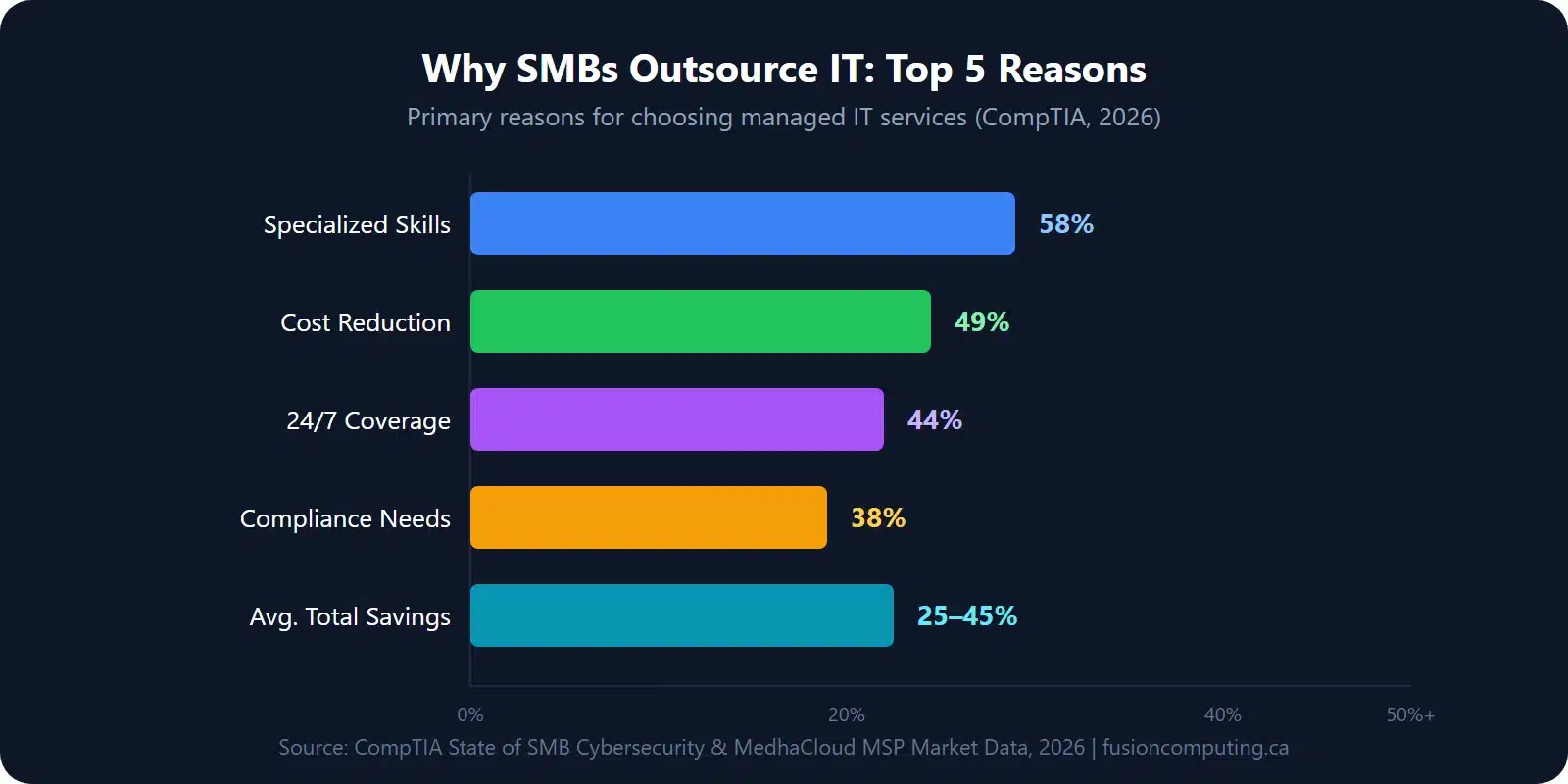
Cost detail: Most Canadian SMBs pay around CA$185 per user per month for fully managed IT. See the full per-user and per-employee breakdown in our managed IT services cost in Canada guide.
4. Hardware and infrastructure (10 to 15%)
Hardware is a capital expense that many small businesses underestimate because the pain is lumpy. In my experience it is nothing for three years, then CA$40,000 in one quarter when everything ages out at once.
- Laptops/desktops, CA$1,200 to CA$2,500 per unit, refreshed every 4 to 5 years.
- Servers (on-prem), CA$5,000 to CA$25,000 depending on role. Many SMBs are moving to cloud-only.
- Networking equipment, switches, access points, firewalls. CA$2,000 to CA$10,000 for a typical office.
- Monitors, docking stations, peripherals, CA$300 to CA$800 per workstation.
The smart move is to spread hardware costs across a 4-to-5-year refresh cycle rather than replacing everything at once. Your IT procurement process should include lifecycle tracking so you’re never surprised.
5. AI and automation tools (5 to 10%)
This is the newest budget category, and it’s growing fast. Gartner projects that business software spending (including AI tools) will grow 14.7% in 2026 to US$1.4 trillion globally.
For Canadian SMBs, the practical AI budget items in 2026 are:
- Microsoft 365 Copilot, CA$24.43/user/month on top of your Microsoft 365 licence. Automates document drafting, email summarization, meeting recaps, and data analysis in Excel.
- Power Automate workflows, included in most Microsoft 365 plans. Automates repetitive tasks like invoice approvals, onboarding checklists, and data entry.
- AI-powered security tools, already bundled in most EDR and SIEM platforms. Not a separate line item for most SMBs.
Does every employee need a Copilot licence on day one? No. A Copilot readiness assessment identifies which roles will see the highest ROI and lets you roll out in phases.
6. Strategic IT planning and consulting (5 to 10%)
This is the category most small businesses skip. In our practice it decides whether the other 90 to 95% of the spend actually delivers value.
- vCIO advisory, quarterly business reviews, technology roadmaps, vendor management, licence optimization. Often included in managed IT agreements.
- IT strategic planning process, an annual or semi-annual cycle that aligns IT spending with business goals.
- Compliance and audit prep, PIPEDA, SOC 2, CIS Controls. See our data security compliance guide for what Canadian businesses need to know.
CompTIA reports that 58% of SMBs cite “access to specialized skills” as the primary reason they outsource IT. A vCIO fills that gap without the cost of a full-time executive hire. Our virtual CIO vs traditional CIO comparison sets a CA$30,000 to CA$54,000 retainer against a CA$200,000 salary line.
How much should your industry spend on IT?

Industry is the strongest single predictor of IT spend. As a planning guide, regulated verticals such as financial services run 7 to 10% of revenue on IT while construction and manufacturing sit near 2 to 4%. The table below breaks that 3x spread down by vertical.
Swipe sideways for the full table →
| Industry | IT as % of Revenue | Top Budget Priority |
|---|---|---|
| Financial services | 7 to 10% | Compliance, cybersecurity, encrypted communications |
| Accounting firms | 5 to 8% | Cloud accounting platforms, PIPEDA compliance, secure file sharing |
| Construction | 2 to 4% | Mobile device management, field connectivity, project management tools |
| Manufacturing | 2 to 4% | OT/IT convergence, industrial cybersecurity, ERP systems |
| Non-profit | 3 to 5% | Cloud migration, donor data security, grant compliance |
| Architecture & engineering | 4 to 7% | High-performance workstations, BIM storage, large file collaboration |
| Transport & logistics | 3 to 5% | Fleet management IT, GPS/IoT, supply chain cybersecurity |
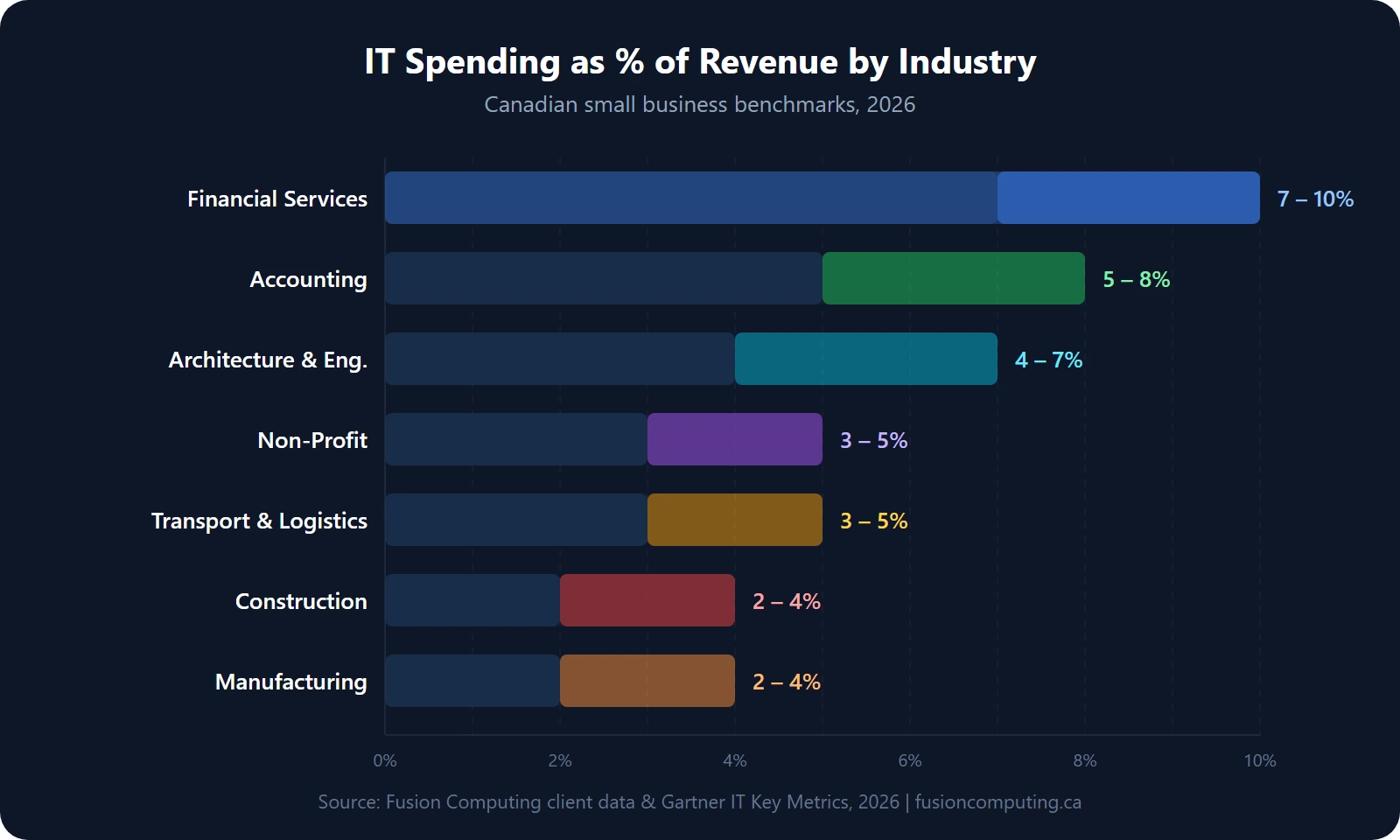
If your business is in a regulated industry (finance, healthcare, legal), budget closer to the high end, 7 to 10% of revenue. The cost of a compliance failure or data breach far exceeds the cost of proper security.
Registered charities work from a different baseline. Microsoft grants Business Basic free for up to 300 users and discounts Business Premium to CA$7.50 per user per month, so a nonprofit IT budget can carry more security for less. See our guide to the Microsoft 365 nonprofit grant and pricing in Canada for what still qualifies in 2026.
How to build an IT budget for a small business: a five-step framework
A defensible IT budget comes together in 5 steps. Inventory what you spend today, benchmark it against peers, find the gaps, forecast for growth and currency exposure, then review quarterly with a named owner. It is the same sequence I walk client CFOs through in a first budget review, and it pairs with the annual cadence in our IT strategic planning process guide.

Step 1: Audit what you’re spending now
Most businesses don’t actually know their total IT spend. Pull together every invoice, subscription, and service contract from the past 12 months. Include:
- Monthly SaaS subscriptions (check credit card statements, “shadow IT” purchases are common)
- Hardware purchases and leases
- Internet and telecom
- IT support invoices or MSP contract
- Security tools and insurance
- One-off project costs (migrations, upgrades, emergency fixes)
An IT business consultation does this systematically. It maps your entire technology stack, identifies waste, and benchmarks your spend against similar organizations; ours runs to 168 checkpoints.
Step 2: Identify your risk exposure
Your budget should be proportional to your risk. Ask:
- What would one hour of downtime cost your business in lost revenue?
- Do you store sensitive client data (financial records, personal health information, legal files)?
- Are you subject to PIPEDA, provincial privacy laws, or industry-specific regulations?
- Have you had a security incident in the past 24 months?
Only 11% of Canadian SMBs have a formal incident response plan, while 52% have none at all. If that describes your business, your cybersecurity budget is too low. Our incident response plan guide for Canadian businesses walks through what you need.
Step 3: Set priorities by business impact
Divide your IT needs into three tiers:
- Non-negotiable, security, backup, compliance, core productivity tools. Fund these first.
- High-impact, proactive monitoring, help desk, hardware refresh, strategic planning. These reduce risk and improve productivity.
- Growth investments, AI tools, automation, new SaaS platforms, expansion infrastructure. Fund these after tiers 1 and 2 are solid.
Step 4: Choose your support model
The biggest budget decision most small businesses face is how they handle IT support. Read our detailed breakdown of what managed IT services actually include before committing to a model. The three options, hourly IT at CA$150 to CA$250 per hour, managed at CA$185 per user per month, and co-managed in between, have radically different cost structures and outcomes.
Step 5: Build in a buffer for unplanned costs
Even with proactive management, things break. A server fails. A critical vendor raises prices. A new compliance requirement lands. I tell clients to budget 10 to 15% above projected spend as a contingency reserve. If you don’t use it, roll it into next year’s hardware refresh or security improvements.
What are the most common IT budgeting mistakes?

Treating cybersecurity as optional
Fusion Computing finds four IT budgeting mistakes account for most of the wasted spend in Canadian SMBs: under-funding cybersecurity, ignoring downtime cost, paying for unused SaaS, and skipping strategic planning. According to IBM’s 2025 Cost of a Data Breach report, the average Canadian breach now costs CA$6.98 million, up 10.4 percent year over year. The four mistakes below compound that exposure.
- Treating cybersecurity as optional. Under-15 percent allocations correlate with higher post-breach recovery cost.
- Ignoring the hidden cost of downtime. A day of email outage or a ransomware lockout runs CA$10,000 to CA$50,000 for a typical 30 to 50 person SMB.
- Paying for tools nobody uses. The average SMB carries 40 to 60 active SaaS subscriptions; a quarterly licence audit recovers 10 to 20 percent.
- Skipping strategic planning. Without an IT strategic plan the budget is a list of invoices, not a set of decisions.
63% of small businesses increased their cybersecurity budgets year over year in 2025, but 66% still cite cost as the top obstacle to stronger security. The math doesn’t work in your favour: the average Canadian breach costs CA$6.98 million, while a managed cybersecurity services program for a 30-person company runs CA$3,000 to CA$6,000/month.
Ignoring the hidden cost of downtime
For a typical 30-to-50-person Canadian SMB, a full day of email outage or a ransomware lockout means CA$10,000 to CA$50,000 in lost productivity and emergency recovery. That is before you count the reputational damage. Proactive monitoring is cheaper than disaster response, every time.
Paying for tools nobody uses
SaaS sprawl is real. The average SMB has 40 to 60 active SaaS subscriptions. We routinely find clients paying for unused licences, duplicate tools, and premium tiers they don’t need. A quarterly licence audit (something a vCIO does as part of standard reviews) typically saves 10 to 20% on software costs alone.
Skipping strategic planning
Without an IT strategic planning process, your budget is just a list of invoices. Strategy turns spending into investment by tying every dollar to a business outcome: reducing risk, increasing productivity, or enabling growth. A 1-page plan reviewed 4 times a year beats a 40-page plan reviewed never.
What Canadian privacy law requires from an IT budget
According to the Office of the Privacy Commissioner of Canada, PIPEDA obliges every business to report breaches that pose a real risk of significant harm. It also requires a written record of every breach, harmful or not, kept for 24 months. Those duties are budget lines, and logging, forensic readiness and legal review all cost money before an incident.
Three Canadian regimes drive most of the compliance spend I see. PIPEDA applies federally to commercial activity. Quebec’s Law 25 adds a mandatory privacy officer and a confidentiality-incident register for firms with Quebec staff or customers. Ontario health custodians answer to PHIPA, which carries its own notification duties.
Insurers now underwrite on controls. In the cyber renewals I sit in on, four controls decide the premium. Underwriters want phishing-resistant MFA on Microsoft 365 and remote access, endpoint detection and response on every device, backups that have been restore-tested, and a written incident response plan. Miss one and you are looking at a higher retention or a declined renewal.
Budget the compliance work as its own line rather than hoping it falls out of the security line. For a 30-person Ontario firm I would plan CA$6,000 to CA$12,000 a year for policy work, breach-register tooling, tabletop rehearsal and evidence collection. Our guide to PIPEDA compliance and our cyber insurance coverage checklist list what auditors and underwriters actually ask for.
IT budget vs IT spend: which number to compare
IT budget and IT spend are two different numbers, and mixing them up is the most common reason a Canadian SMB benchmark looks wrong. The budget is the operational envelope, roughly CA$325 to CA$425 per employee per month. Spend is what actually leaves the bank account once capital projects land, and that figure runs CA$500 to CA$800.
Boards usually compare the wrong one. A CFO who benchmarks total spend against a 4 to 7% budget benchmark will conclude the company is overspending, when the gap is a laptop refresh that lands once every four years. Separate the run-rate from the project line before you compare anything.
The run-rate column is the one a managed agreement stabilises. See predictable, scalable IT costs for how a fixed per-user fee turns that line into a number you can defend a year ahead.
Three practical splits keep the two numbers honest. Operating expense covers anything billed monthly, from Microsoft 365 seats to the managed IT agreement. Capital expense covers hardware and one-time migrations, which you amortize across the 4-to-5-year refresh cycle. Foreign exchange sits on top, because most SaaS is billed in US dollars and a 5% currency move is a real budget variance.
In our practice the fix is a two-column budget sheet: one column for the monthly run-rate, one for dated capital items. Owners who keep those columns apart stop arguing about whether 6% is too much and start arguing about which project moves. Fold the split into your annual IT strategic planning process and benchmark the run-rate column only.
IT budget planning checklist for 2026
Use this 10-point list as a quick self-assessment before you sign off on next year’s spend. It condenses the benchmarks in this guide, the Gartner-derived 4 to 7% revenue band, the 15% cybersecurity floor, and the 4-to-5-year hardware refresh cycle, into yes-or-no questions you can score in about 5 minutes.
- □ You know your total annual IT spend, all categories, including shadow IT.
- □ Cybersecurity is at least 15% of your IT budget.
- □ You have endpoint detection and response (EDR) on every device.
- □ You have tested backups with a documented recovery process.
- □ Your Microsoft 365 licences match your actual security needs.
- □ You have a hardware refresh plan with no laptops older than 5 years in production.
- □ You have an incident response plan that staff have actually rehearsed.
- □ Someone reviews your IT spend quarterly: an internal IT lead, a vCIO or your MSP.
- □ You have cyber insurance and know what it covers.
- □ Your IT budget is tied to a strategic plan that goes past keeping the lights on.
How many did you check? If fewer than 7, you’ve got gaps. That’s normal, most businesses I assess do. The point is to know where they are so you can prioritize.
Fusion Computing helps businesses plan and optimize their IT budgets, with reviews run by a CISSP-led team.
Related resources
- Managed IT services cost in Canada, pricing by model
- Managed IT services, what an agreement includes
- IT strategic planning process, align IT with business goals
- IT operations best practices, the operating disciplines the budget funds
- Hourly IT vs. managed services, cost comparison
- vCIO services, IT leadership without the full-time hire
- IT business consultation, a 168-point gap assessment
- Cyber insurance coverage checklist, what underwriters require
Fusion Computing serves Canadian businesses across:
Managed IT, Caledon · Managed IT, Cambridge · Managed IT, Cobourg
Ready to see where your IT budget actually compares?
Tell us your team size, industry and current IT spend. We aim to reply within one business day with how your numbers stack up.
Start the conversation
Share the business problem, team size and timing. Managed services usually suit 10 to 150 employees; smaller project and AI enquiries are welcome.
- ✔We aim to reply in 1 business day
- ✔CISSP-led Canadian team
- ✔No obligation
By submitting this form, you consent to Fusion Computing contacting you. We do not sell your information. We use service providers to operate the form and our communications. See our Privacy Policy.
Or call us directly: (416) 566-2845
Frequently asked questions
For the full overview of what a Canadian managed-IT engagement covers across all six budget categories, see our managed IT services hub.
According to the Canadian Centre for Cyber Security National Cyber Threat Assessment, ransomware ranks as the top cybercrime threat to Canadian critical infrastructure, with supply-chain attacks a leading threat. The Canadian Anti-Fraud Centre logged record business email compromise losses in its latest reporting. BDC SMB benchmarking confirms that firms allocating 4 to 7 percent of revenue to IT, with 15 percent to cybersecurity, see fewer disruptive incidents than peers underspending those bands. Sources: statcan.gc.ca, cyber.gc.ca, ised-isde.canada.ca, antifraudcentre-centreantifraude.ca, bdc.ca.
How much should a small business spend on IT per employee?
Canadian small businesses typically spend CA$700 to CA$1,100 per employee per month on IT when you include hardware, software, security, support, and cloud services. Businesses with 10 to 50 employees using a managed IT provider usually pay CA$185/user/month for support and security, with additional costs for licences, hardware, and cloud infrastructure on top.
What percentage of revenue should go to IT?
The benchmark for Canadian SMBs is 4 to 7% of annual revenue. Gartner’s data shows an average of 6.9% for SMBs, compared to 4.3% for enterprises. The exact percentage depends on your industry, risk profile, and growth stage. Heavily regulated industries like finance and healthcare should budget toward the higher end.
How much should a small business budget for cybersecurity?
At minimum, 15% of your total IT budget should go to cybersecurity in 2026. That covers endpoint protection, email security, security awareness training, firewall management, and vulnerability scanning. If you store sensitive client data or operate in a regulated industry, budget 20% or more. A cybersecurity assessment can identify exactly where your gaps are.
Is it cheaper to hire in-house IT or use a managed service provider?
For businesses under 100 employees, outsourcing to an MSP is almost always more cost-effective. A single in-house IT generalist in Canada costs CA$70,000 to CA$95,000 in salary alone, plus benefits, training, tools, and management overhead. That one person can’t cover cybersecurity, cloud, networking, help desk, and strategic planning. A managed IT agreement at CA$185/user/month gives you an entire team for less than the two-person department that coverage takes.
What is the biggest IT budget mistake small businesses make?
Underspending on cybersecurity while overspending on unused software. We regularly see businesses paying for premium SaaS tiers they don’t need while running no endpoint detection, no email filtering, and no backup testing. Flip those priorities: fund security first, then optimize software spend with quarterly licence reviews, which typically recover 10 to 20% of software costs.
How much should a 20-person Canadian business budget for IT?
Using the 11-to-25-employee band above, plan for roughly CA$7,200 to CA$11,400 per employee per year, about CA$12,000 to CA$19,000 per month all-in for a 20-person firm. Regulated firms should budget toward the top of the range.
How do we budget for Microsoft 365 Copilot and other AI tools?
Start with 5 to 10% of your IT budget for AI and automation. Microsoft 365 Copilot runs CA$24.43 per user per month on top of your existing licence, so pilot it with the roles most likely to see ROI instead of buying every seat on day one. A Copilot readiness assessment shows where to start.
How often should we review our IT budget?
Quarterly at minimum. Technology costs change fast, vendors raise prices, new tools replace old ones, headcount shifts, and security threats evolve. A quarterly review with your MSP or vCIO, 4 touchpoints a year, keeps your budget aligned with reality instead of last year’s assumptions.
Last updated: August 2026.


