
Managed Services vs. Professional Services: What Your Business Actually Needs
Mike Pearlstein is CEO of Fusion Computing and holds the CISSP, the gold standard in cybersecurity certification. He has led Fusion’s managed IT and cybersecurity practice since 2012, serving Canadian businesses across Toronto, Hamilton, and Metro Vancouver.
For a full overview of what managed IT services include, see our managed IT services page.
Mike Pearlstein, CISSP | Fusion Computing
Every business hits an IT wall eventually. Maybe it’s the same things breaking every month. Maybe a cloud migration is staring you down and nobody has the skills for it. Outside help isn’t the question. It’s what kind.
Two terms come up constantly: managed services vs professional services. Most of the content explaining them reads like a textbook. Here’s what they actually mean for a Canadian business with 10 to 150 employees, and how to pick the right one.
KEY TAKEAWAYS
- Managed services = ongoing IT operations (helpdesk, monitoring, security, patching). Professional services = one-time projects (migrations, assessments, deployments).
- Most Canadian SMBs end up needing both — a project kicks things off, then rolls into a managed agreement for continuous coverage.
- 82% of Canadian organizations now say a vendor’s country of origin matters more than a year ago for cybersecurity (CIRA, 2025).
- Managed IT for 10–150 users typically costs less than a single full-time IT hire while giving you an entire team.
Why this decision matters more for Canadian businesses
Most content comparing managed services vs professional services is written for a U.S. audience. Canada is different in ways that directly affect which model fits.
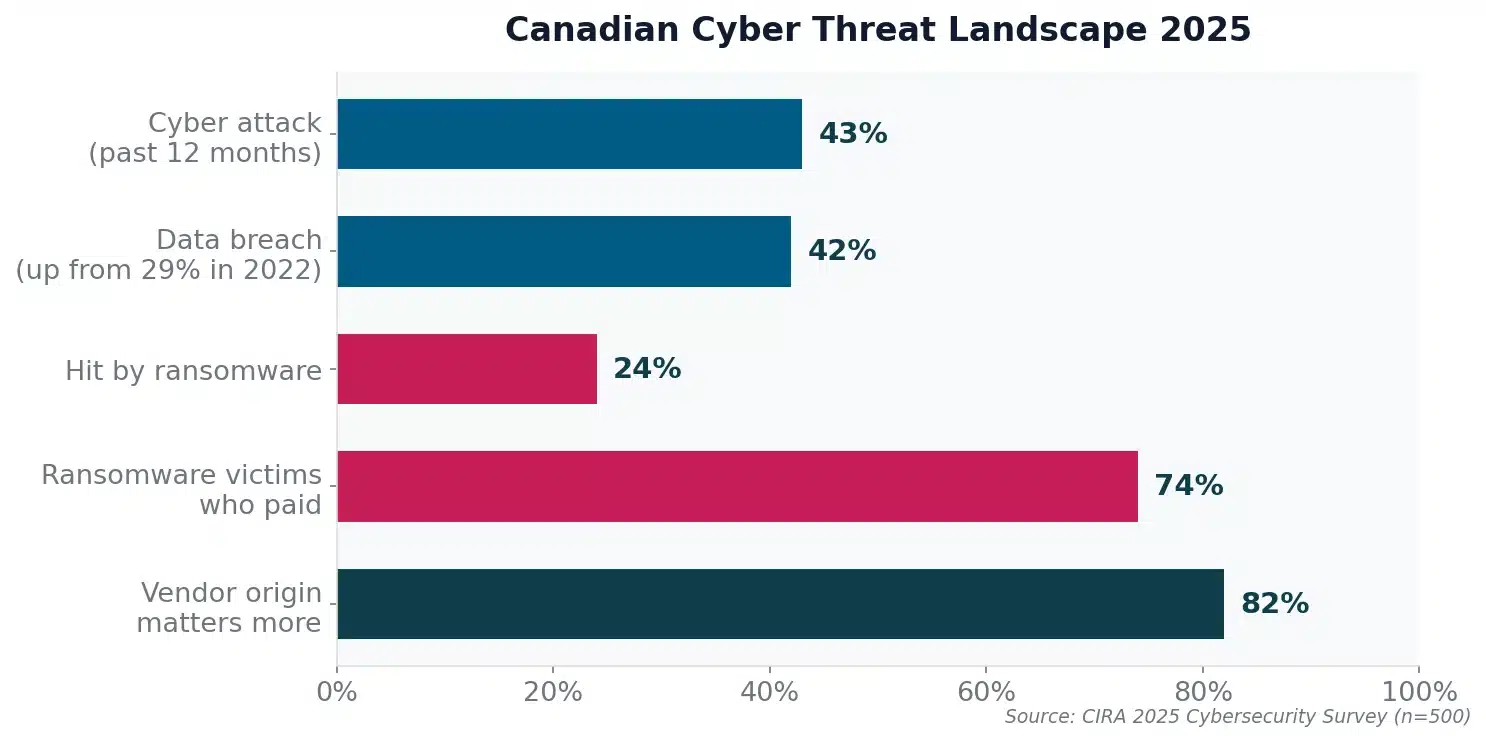
The threat environment demands ongoing coverage, not one-time fixes. Statistics Canada reported that about 1 in 6 Canadian businesses were impacted by cyber security incidents in 2023, and recovery spending reached $1.2 billion. One-off security projects help, but they don’t stop the next attack. That takes continuous monitoring, patching, and response.
Ransomware remains an operational risk. The Cyber Centre’s National Cyber Threat Assessment 2025-2026 identifies ransomware as the top cybercrime threat facing Canada’s critical infrastructure. This is an ongoing operational risk, not a project.
Canadian businesses are choosing Canadian IT providers. When sourcing cybersecurity solutions specifically, CIRA found that 82% of Canadian organizations say a vendor’s country of origin matters more than it did a year ago, and 56% have reconsidered U.S.-based providers due to political and trade uncertainty. Data sovereignty (69%) outranked price (29%) as the top consideration when selecting cybersecurity products. For a managed services relationship where your provider has ongoing access to your systems, many Canadian businesses now treat local hosting and Canadian ownership as procurement priorities rather than nice-to-haves.
IT outsourcing is accelerating. Grand View Research projects the Canada IT services outsourcing market to grow from US$27.4 billion in 2024 to US$52.4 billion by 2030. That growth is driven by SMBs that don’t have the budget for a full internal IT department but can’t afford to operate without professional-grade support.
Security frameworks require recurring effort, not one-time projects. If your business follows a recognized security framework (and you should), many of the controls are recurring operational practices. You can’t implement CIS Controls as a one-time project and walk away. Patch management, access control reviews, log monitoring, backup testing, vulnerability scanning: these are managed services activities. At Fusion, we align our security program to CIS Controls v8.1, and I hold the CISSP.
What managed IT services actually look like
In a managed services vs professional services comparison, this is where the day-to-day difference gets real. Managed services means paying an outside team to run your IT on an ongoing basis. Not just when something breaks. Every day.
Here’s what a typical week looks like when you’re working with a managed service provider:
Monday morning, a few employees can’t log in after a password policy change. Your MSP’s helpdesk handles it. Tuesday, the MSP pushes a batch of security patches across all endpoints during off-hours. Wednesday, an endpoint detection alert fires on a workstation that downloaded a suspicious file. The MSP’s security team isolates it, investigates, and closes the ticket before it spreads. Thursday, your Microsoft 365 licensing renewal comes up. The MSP handles the vendor call, reviews your seat count, and flags two unused licenses you’ve been paying for. Friday, you get a monthly report showing uptime, ticket volume, and a list of what’s coming next.
That’s the managed services side of the managed services vs professional services split. Not a once-in-a-while call when things go sideways. Ongoing, predictable support with a team that already knows your setup.
Billing reflects this. A flat monthly fee per user or per device, with scope defined in your service agreement. More predictable than break-fix or hourly billing. If your team grows from 30 to 60 users, the cost scales with you. If you shrink, it scales down.
At Fusion, our helpdesk resolves 93% of issues on first contact. That means your employees aren’t stuck waiting through escalation queues. They call, they get help, they get back to work.
For a deeper look at how managed IT works: What Are Managed IT Services?
What professional IT services look like
On the other side of managed services vs professional services, you have project work. A defined scope, a start date, a finish date, and a deliverable.
Your office lease is up and you’re moving to a new space. You need someone to plan the network layout, set up the cabling, configure the switches, migrate the servers, and make sure everyone can log in on day one. That’s a professional services engagement. It ends when the project ends.
Other common scenarios where Canadian businesses bring in professional services:
Cloud migrations. You’re moving from on-premises Exchange to Microsoft 365, or shifting file servers to SharePoint. This needs planning, staging, data migration, and user training. It’s a project, not ongoing support.
Security assessments. Maybe your cyber insurer sent a questionnaire and half the answers are blank. A professional services engagement produces a risk assessment, a gap analysis, and a prioritized list of what to fix. Fusion offers this as a standalone cybersecurity assessment.
M365 or Copilot deployments. Rolling out new tools across your organization takes configuration, policy setup, and user enablement. It has a clear beginning and end.
Technology audits. Something feels off with what your current provider has been telling you. A third-party IT business assessment gives you a clean, unbiased picture of where things stand.
Professional services bill differently. Fixed project fee or time-and-materials rate. Pay for the engagement, the team delivers, and the contract closes. That’s the core of managed services vs professional services billing: monthly retainer vs project invoice.
Managed services vs professional services: which one fits?
Forget the abstract comparison. Think about your actual situation right now.
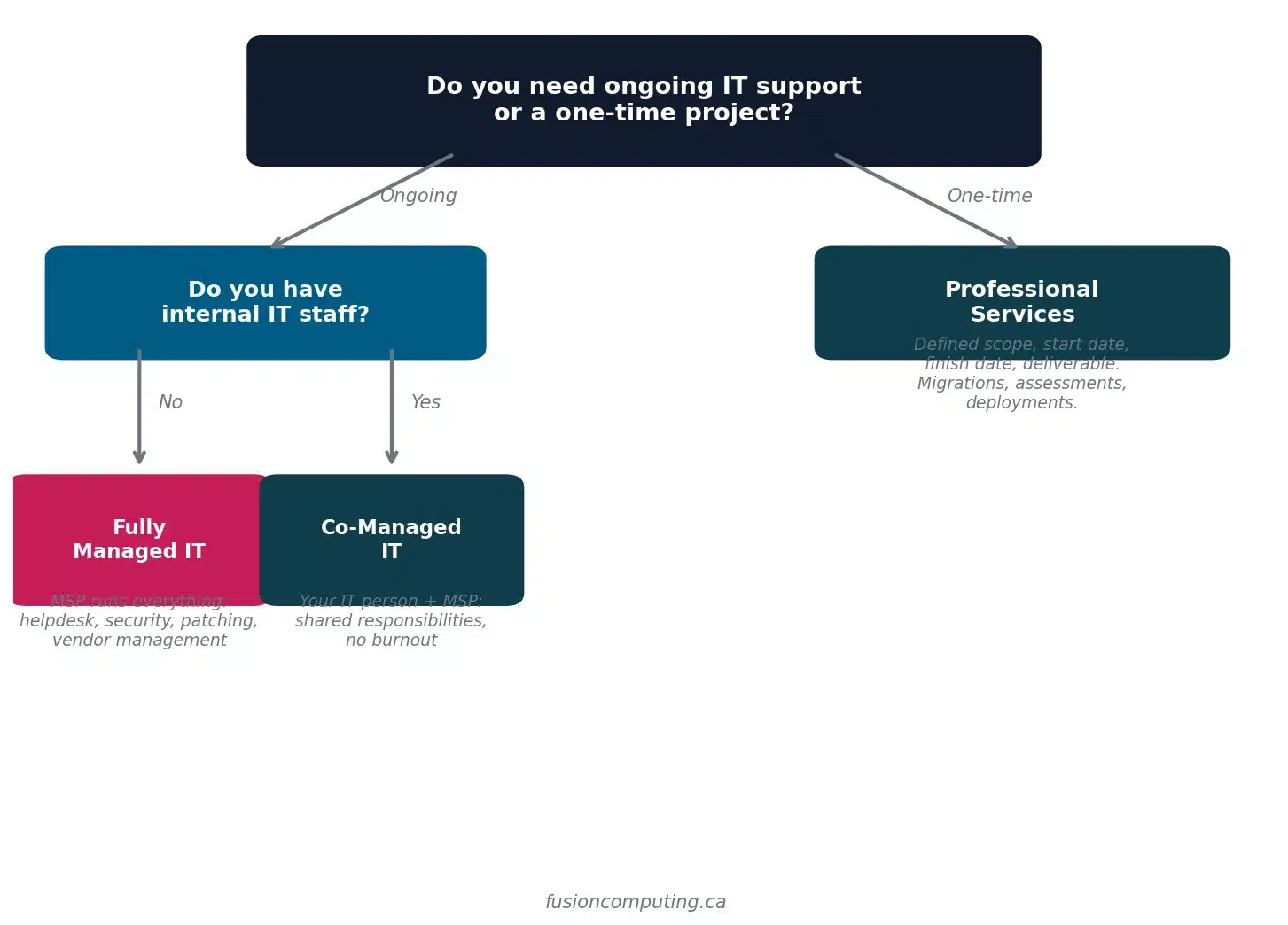
You have zero or one IT people and things keep breaking. That’s fully managed IT. You need someone running the whole show: helpdesk, monitoring, patching, security, vendor management, backup verification. Trying to solve that with a string of professional services projects is like hiring a plumber every time a pipe leaks instead of fixing the plumbing. See Fusion’s managed IT support.
You have an internal IT person who’s drowning. That’s co-managed IT. Your IT person keeps the strategic work. Meanwhile the MSP picks up monitoring, overnight coverage, security, and the overflow tickets that pile up. Co-managed arrangements have been growing quickly among Canadian SMBs because they let businesses keep their IT knowledge in-house without burning out the one person who holds it all together. Learn about Fusion’s co-managed model.
You have a stable environment but need a specific thing done. That’s professional services. Ongoing support isn’t what you need. Someone to do the cloud migration, the security assessment, or the new office buildout is. Once it’s delivered, you’re good.
You got a cyber insurance questionnaire and can’t answer half of it. Begin with a professional services engagement (a cybersecurity assessment), then transition to managed services to maintain the controls. Insurance renewal comes around every year. You don’t want to be scrambling every twelve months.
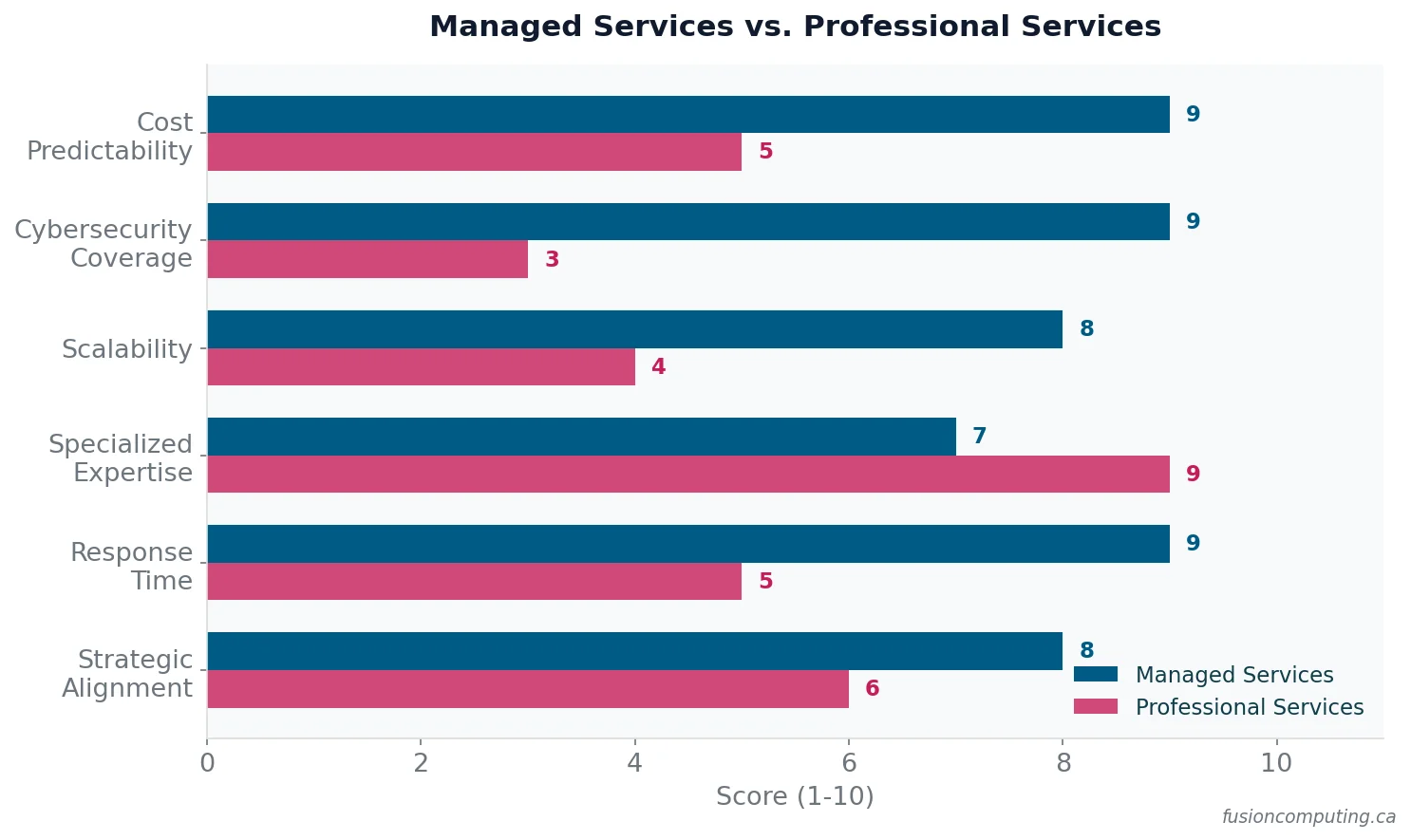
Managed services vs professional services at a glance
| Managed Services | Professional Services | |
|---|---|---|
| Scope | Broad, ongoing | Narrow, project-based |
| Billing | Flat monthly fee | Fixed project or T&M rate |
| Duration | Continuous | Ends when the project is done |
| Best for | Daily support, monitoring, security | Migrations, deployments, assessments |
| What happens between projects | Continuous monitoring and response | Nothing, unless you re-engage |
When you compare managed services vs professional services, the biggest gap isn’t in the table. It’s what happens between projects. With professional services, when the project is done, nobody’s watching. Nobody’s patching your systems at 2 a.m. Nobody’s catching the phishing email that hit three inboxes on a Saturday. Managed services fill that gap.
Most businesses end up needing both
In the managed services vs professional services debate, most businesses end up doing both. A business calls because something specific is broken or because they need an assessment. During the engagement, we find outdated systems, missing patches, weak backup configurations, and no documentation. The business realizes they don’t just need a fix; they need someone watching the store.
So the project wraps up and rolls into a managed services agreement. At Fusion, the first 90 days are structured: we document the environment, stabilize the infrastructure, and establish monitoring and security baselines. After that, it’s steady-state: helpdesk, patching, security, vendor coordination, and regular reviews with your team.
If a new project comes up later (a cloud migration, an office move, a Copilot rollout), your MSP already knows your environment. No ramp-up time. No explaining your setup from scratch. That continuity is worth more than most people realize until they’ve lived without it.
What to look for in a Canadian MSP
Once you’ve settled the managed services vs professional services question and you’re leaning managed (or hybrid), here’s what separates a good provider from one that’ll repeat your last headaches:
Canadian-owned, Canadian data. Your data should stay in Canada, processed under Canadian law. Ask where their data centres are. Ask who owns the company.
Security credentials. CISSP is widely regarded as the top certification for cybersecurity leadership. CIS Controls alignment gives you a framework you can point to when clients, insurers, or auditors ask about your security posture.
Transparent first-contact resolution rates. If an MSP won’t tell you how often they resolve issues on the first call, they probably don’t track it. Fusion tracks a 93% first-contact resolution rate.
No restrictive contracts. Nobody should have to sign a three-year contract to get competent IT support. If the provider needs a restrictive contract to keep you, that tells you something.
Structured onboarding. Ask what the first 90 days look like. If the answer is vague, keep looking. Onboarding is where managed services succeed or fail.
Frequently asked questions
Is it cheaper to use managed services or hire IT staff?
For businesses with 10 to 50 employees, managed services usually cost less than a single full-time IT hire. An MSP gives you access to an entire team (helpdesk, security, network, strategy) for a predictable monthly fee. Larger organizations change that math, which is why co-managed models exist.
Can I keep my internal IT person and still use managed services?
Yes. That’s the co-managed model, and it’s one of the most common setups we see. Your IT person handles the work that requires institutional knowledge (user training, business applications, strategic projects), and the MSP picks up monitoring, security, patching, after-hours coverage, and overflow. It reduces burnout and gives your IT person room to focus on things that move the business forward.
How long does it take to switch to a managed service provider?
At Fusion, we run a structured 90-day onboarding. Weeks one and two: documentation, access, and urgent fixes. Weeks three and four bring monitoring and patching online. Then months two and three are all about optimization, establishing a clean baseline so your team never has to deal with a hard cutover.
What if I need a one-time project but I’m already on managed services?
Most MSPs handle project work for existing clients. Advantage: the team already knows your setup, your users, and your constraints. There’s no onboarding cost for the project. At Fusion, project work for managed clients is scoped separately but delivered by the same team.
Do managed services include cybersecurity?
They should. Any managed services agreement that doesn’t include baseline cybersecurity (endpoint protection, patch management, backup verification, MFA enforcement) is leaving you exposed. At Fusion, security is built into every managed engagement, not sold as an add-on. Businesses that need deeper coverage can step up to our managed cybersecurity services.
What should a Canadian business look for in an MSP?
Canadian data residency, security certifications (CISSP is widely considered the standard for cybersecurity leadership), a transparent first-contact resolution rate, no restrictive contracts, and a clear onboarding plan. Also ask about their security framework. If they can’t name one, they don’t have one. Fusion aligns to CIS Controls v8.1 and has been recognized among Canada’s 50 Best Managed IT Companies.
How much do managed IT services cost in Canada?
Pricing depends on user count, complexity, and scope. For a detailed breakdown, read our guide on the cost of IT support for small businesses in Canada. Short answer: for businesses with 10 to 150 users, managed IT is usually cheaper than building an equal internal team.
What’s the difference between managed services and break-fix IT?
Break-fix means you call someone when something breaks, and you pay for the repair. There’s no monitoring, no prevention, no relationship between incidents. Managed services is proactive: the provider monitors, patches, and manages your environment continuously so problems get caught before they become outages. We wrote a full comparison: Break-Fix vs. Managed Services.
Next steps
Still weighing managed services vs professional services? Start with a conversation. We’ll ask about your current setup, where things are breaking, and what you’ve already tried. No pitch deck. No pressure. Thirty minutes and you’ll have a clear picture of what makes sense.
Book a Consultation or call (416) 566-2845.
Fusion Computing helps businesses choose the right IT model across Toronto and the GTA, Hamilton, and Metro Vancouver.
Related Resources
- Outsourced IT Services
- Staff Augmentation vs Managed Services: Which Should You …
- Managed IT Services for the Construction Industry


