
How Much Should a Small Business Spend on IT in 2026? A Canadian IT Budget Guide
Mike Pearlstein is CEO of Fusion Computing and holds the CISSP, the gold standard in cybersecurity certification. He has led Fusion’s managed IT and cybersecurity practice since 2012, serving Canadian businesses across Toronto, Hamilton, and Metro Vancouver.
Canadian small businesses spend an average of 4–7% of annual revenue on IT. That translates to roughly $700–$1,100 per employee per month once you factor in hardware, software, security, support, and cloud services. But most owners don’t know whether they’re overspending on the wrong things or underspending in areas that leave them exposed.
This guide breaks down exactly where your IT dollars should go in 2026, with Canadian-specific benchmarks, real cost ranges, and a framework you can use to build a budget that actually protects and grows your business.
What does a typical small business IT budget look like in Canada?
According to Gartner’s 2026 forecast, worldwide IT spending will reach $6.15 trillion this year, up 10.8% from 2025. Small and midsize businesses account for a growing share of that spend, with global SMB IT spending projected at $1.18 trillion in 2026.
For Canadian SMBs specifically, here are the benchmarks that matter:
| Company Size | Annual Revenue | IT as % of Revenue | Approx. Annual IT Budget |
|---|---|---|---|
| 1–10 employees | Under $1M | 6–7% | $30,000–$70,000 |
| 10–50 employees | $1M–$10M | 4–6% | $60,000–$500,000 |
| 50–200 employees | $10M–$50M | 3–5% | $300,000–$2M |
Gartner’s IT Key Metrics Data puts the average at 6.9% of revenue for SMBs, compared to 4.3% for enterprises. Smaller companies pay a proportionally higher “technology tax” because fixed costs like a firewall, backup system, or Microsoft 365 licensing don’t scale down linearly with headcount.
Why the percentage-of-revenue benchmark isn’t enough
Revenue percentage is a starting point, not an answer. A $5M accounting firm with 30 employees running entirely on cloud applications has different IT needs than a $5M construction company with field crews, shared tablets, and project management software. The real question is: what are you buying, and is it actually reducing risk and downtime?
Where should your IT budget go? The six core categories
Every IT budget, regardless of company size, breaks down into six categories. The percentages below reflect what we see across Fusion’s Canadian client base in 2026:
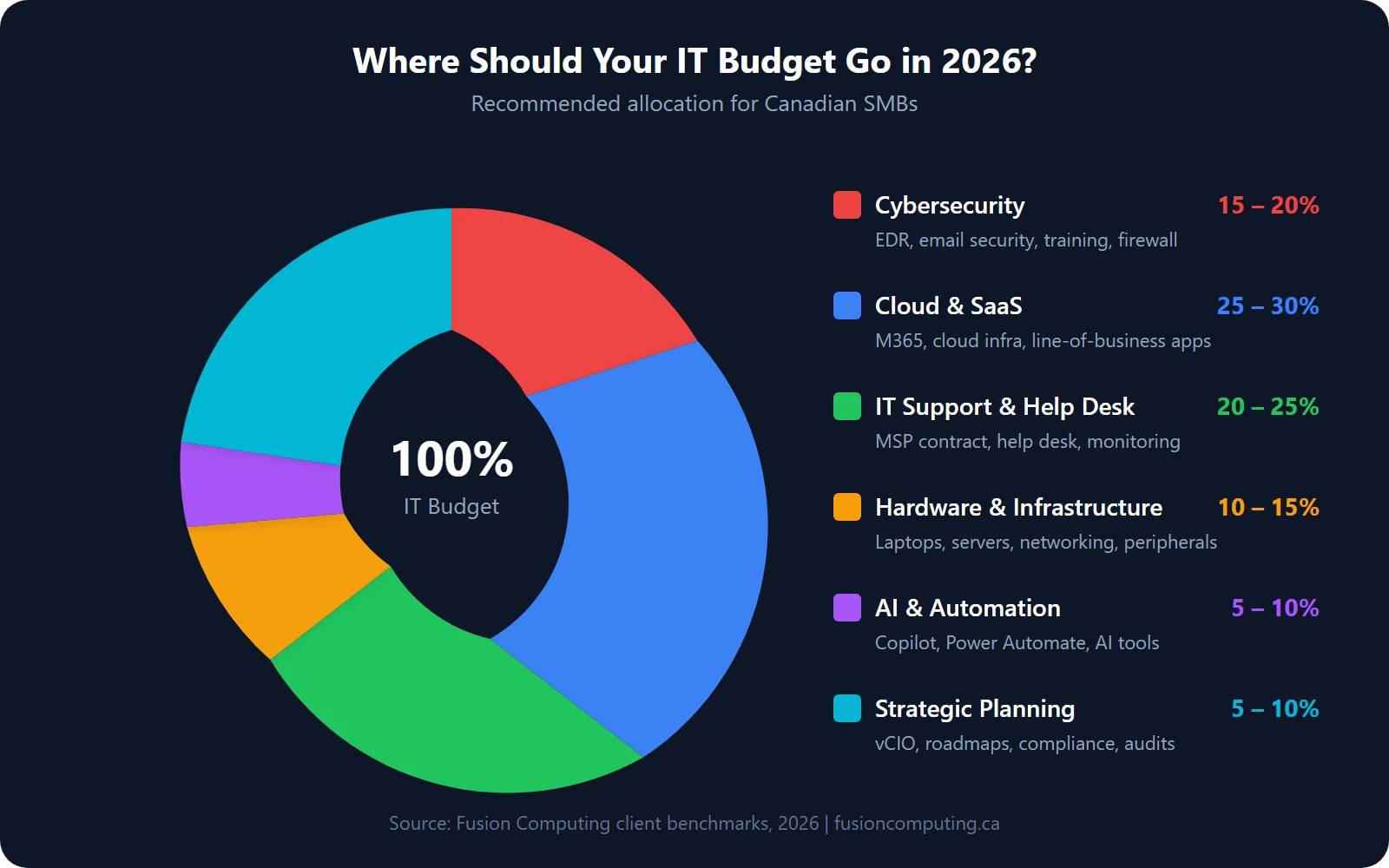
1. Cybersecurity (15–20% of IT budget)
This is the fastest-growing category. SMBs now allocate an average of 14.8% of their IT budget to cybersecurity, up from 10.2% in 2022, according to MedhaCloud’s 2026 SMB spending analysis. And that number is still too low for most businesses.
Your cybersecurity line items should include:
- Endpoint detection and response (EDR) — replaces traditional antivirus. $3–$8 per endpoint per month.
- Email security and phishing protection — $2–$5 per user per month.
- Security awareness training — $1–$3 per user per month.
- Firewall and network security — $50–$300/month depending on appliance and monitoring.
- Vulnerability scanning and patching — often bundled with managed cybersecurity services.
- Cyber insurance premiums — increasingly a line item. See our cyber insurance coverage checklist for what underwriters require.
The Canadian Centre for Cyber Security’s 2025–2026 National Cyber Threat Assessment warns that Canadian SMBs are increasingly targeted by ransomware operators and supply-chain attacks. A data breach in Canada now costs an average of CA$6.98 million according to IBM’s 2025 Cost of a Data Breach report, up 10.4% year over year. For a 30-person business, even a fraction of that number is existential.
If you’re unsure where your gaps are, a cybersecurity assessment is the fastest way to find out.
2. Cloud services and SaaS licensing (25–30%)
For most Canadian SMBs, this is the single largest line item. It includes:
- Microsoft 365 Business Premium — CA$28.20/user/month (includes Teams, Exchange, SharePoint, Intune, and Defender). This is the baseline licence we recommend for businesses that need security and device management built in.
- Cloud infrastructure (Azure, AWS) — varies wildly. A typical SMB running a few VMs and storage might spend $500–$3,000/month.
- Line-of-business SaaS — CRM, ERP, accounting software, project management. Average SaaS spend per employee reached $4,830/year in 2025, according to Cledara’s Software Spend Report.
- Backup and disaster recovery — cloud backup at $5–$15 per endpoint per month. See our guide to disaster recovery best practices.
The trap here is SaaS sprawl. We regularly find clients paying for 3–4 overlapping tools that do the same thing. A vCIO can audit your licence stack and often cut 15–20% without losing functionality.
3. IT support and help desk (20–25%)
This is where the break-fix vs. managed services decision hits your budget directly.
| Model | Typical Cost | What You Get |
|---|---|---|
| Break-fix (hourly) | $150–$250/hour | Reactive support only. You call when something breaks. |
| Managed IT services | $180–$250/user/month | 24/7 monitoring, help desk, patching, security, strategic planning, backup. |
| Co-managed IT | $80–$150/user/month | Supplements your internal IT team with overflow support, security, and strategic planning. |
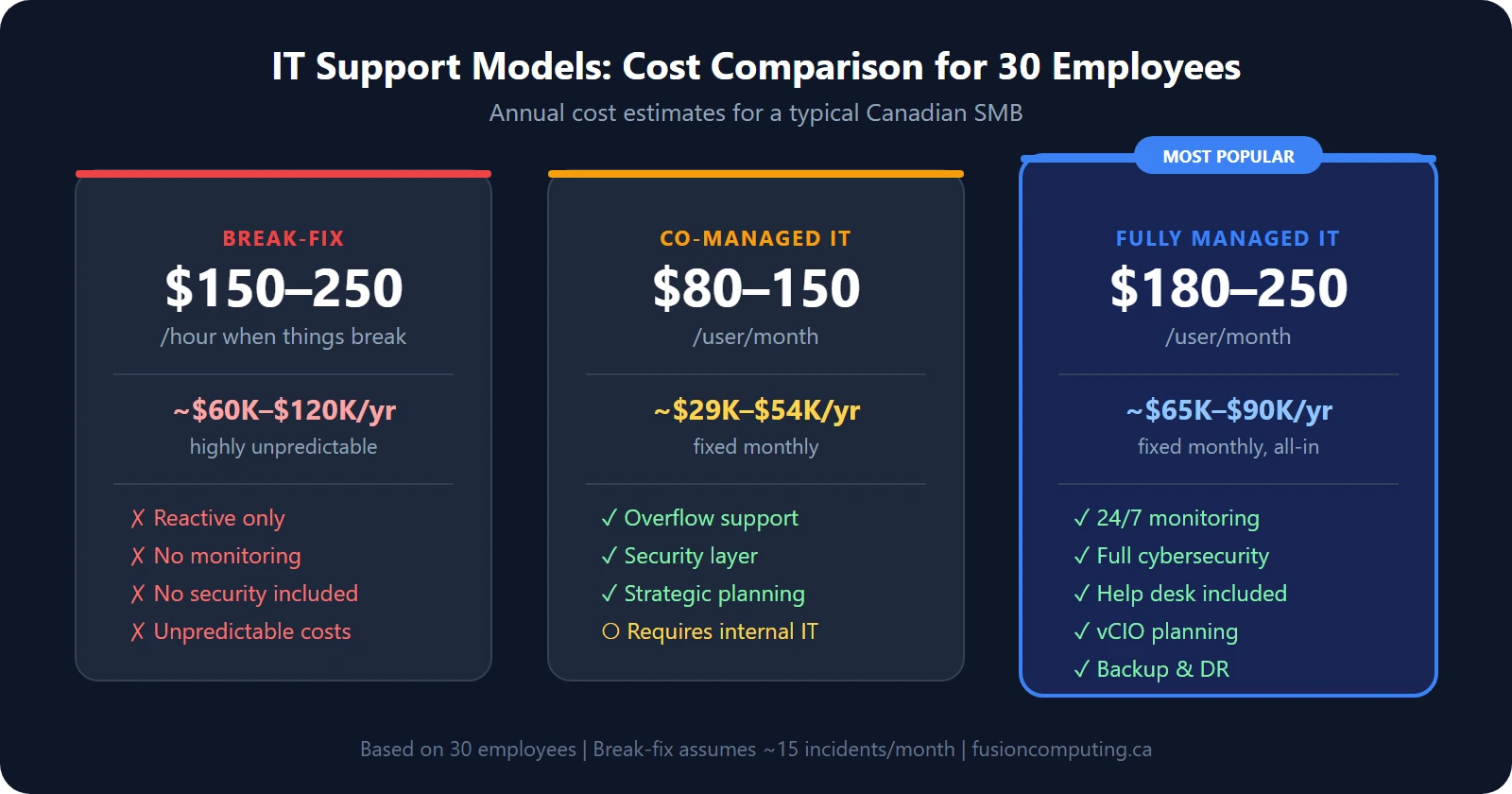
Organizations using managed IT services save an average of 25–45% on total IT costs compared to fully in-house operations, according to industry data from MedhaCloud. The savings come from predictable monthly costs replacing unpredictable emergency spending, plus proactive monitoring that catches problems before they cause downtime.
For a detailed cost breakdown, see our dedicated guide: How much do managed IT services cost in Canada?
4. Hardware and infrastructure (10–15%)
Hardware is a capital expense that many small businesses underestimate because the pain is lumpy — nothing for three years, then $40,000 in one quarter when everything ages out at once.
- Laptops/desktops — CA$1,200–$2,500 per unit, refreshed every 4–5 years.
- Servers (on-prem) — CA$5,000–$25,000 depending on role. Many SMBs are moving to cloud-only.
- Networking equipment — switches, access points, firewalls. CA$2,000–$10,000 for a typical office.
- Monitors, docking stations, peripherals — CA$300–$800 per workstation.
The smart move is to spread hardware costs across a refresh cycle rather than replacing everything at once. Your IT procurement process should include lifecycle tracking so you’re never surprised.
5. AI and automation tools (5–10%)
This is the newest budget category, and it’s growing fast. Gartner projects that business software spending (including AI tools) will grow 14.7% in 2026 to $1.4 trillion globally.
For Canadian SMBs, the practical AI budget items in 2026 are:
- Microsoft 365 Copilot — CA$40/user/month on top of your M365 licence. Automates document drafting, email summarization, meeting recaps, and data analysis in Excel.
- Power Automate workflows — included in most M365 plans. Automates repetitive tasks like invoice approvals, onboarding checklists, and data entry.
- AI-powered security tools — already bundled in most EDR and SIEM platforms. Not a separate line item for most SMBs.
Not every business needs Copilot licences for every employee on day one. A Copilot readiness assessment identifies which roles will see the highest ROI and lets you roll out in phases.
6. Strategic IT planning and consulting (5–10%)
This is the category most small businesses skip — and it’s the one that determines whether all the other spending actually delivers value.
- vCIO advisory — quarterly business reviews, technology roadmaps, vendor management, licence optimization. Often included in managed IT agreements.
- IT strategic planning — annual or semi-annual process that aligns IT spending with business goals.
- Compliance and audit prep — PIPEDA, SOC 2, CIS Controls. See our data security compliance guide for what Canadian businesses need to know.
CompTIA reports that 58% of SMBs cite “access to specialized skills” as the primary reason they outsource IT. A vCIO fills that gap without the cost of a full-time executive hire.
Get a Custom IT Assessment for Your Business
IT budget benchmarks by industry in Canada
Not every industry spends the same way. Here’s what we see across Fusion’s client base and supported by industry data:
| Industry | IT as % of Revenue | Top Budget Priority |
|---|---|---|
| Financial services | 7–10% | Compliance, cybersecurity, encrypted communications |
| Accounting firms | 5–8% | Cloud accounting platforms, PIPEDA compliance, secure file sharing |
| Construction | 2–4% | Mobile device management, field connectivity, project management tools |
| Manufacturing | 2–4% | OT/IT convergence, industrial cybersecurity, ERP systems |
| Non-profit | 3–5% | Cloud migration, donor data security, grant compliance |
| Architecture & engineering | 4–7% | High-performance workstations, BIM storage, large file collaboration |
| Transport & logistics | 3–5% | Fleet management IT, GPS/IoT, supply chain cybersecurity |
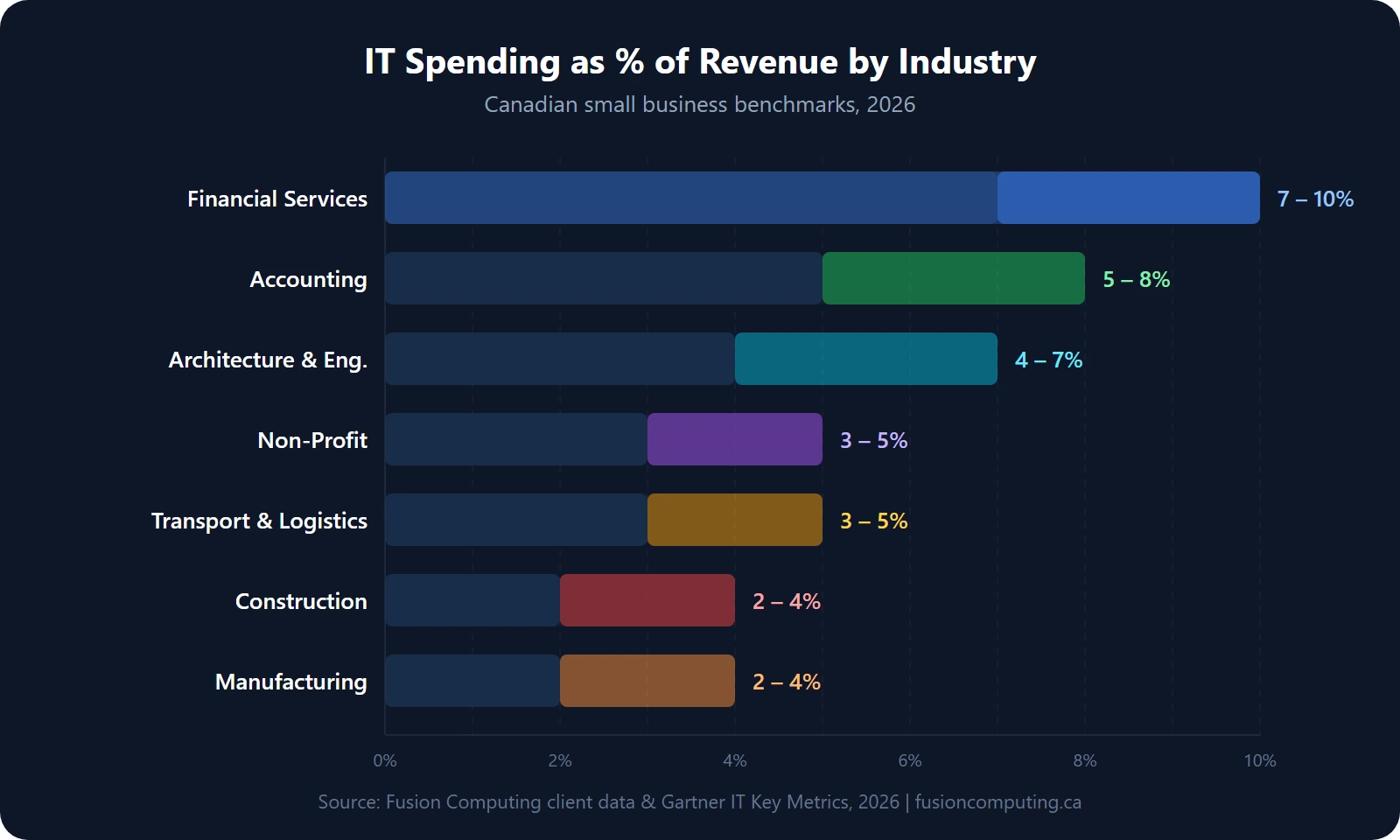
If your business is in a regulated industry (finance, healthcare, legal), budget closer to the high end. The cost of a compliance failure or data breach far exceeds the cost of proper security.
How to build an IT budget for your business: a five-step framework
Step 1: Audit what you’re spending now
Most businesses don’t actually know their total IT spend. Pull together every invoice, subscription, and service contract from the past 12 months. Include:
- Monthly SaaS subscriptions (check credit card statements — “shadow IT” purchases are common)
- Hardware purchases and leases
- Internet and telecom
- IT support invoices or MSP contract
- Security tools and insurance
- One-off project costs (migrations, upgrades, emergency fixes)
An IT business assessment does this systematically. It maps your entire technology stack, identifies waste, and benchmarks your spend against similar organizations.
Step 2: Identify your risk exposure
Your budget should be proportional to your risk. Ask:
- What would one hour of downtime cost your business in lost revenue?
- Do you store sensitive client data (financial records, personal health information, legal files)?
- Are you subject to PIPEDA, provincial privacy laws, or industry-specific regulations?
- Have you had a security incident in the past 24 months?
Only 11% of Canadian SMBs have a formal incident response plan, while 52% have none at all. If that describes your business, your cybersecurity budget is too low. Our incident response plan guide for Canadian businesses walks through what you need.
Step 3: Set priorities by business impact
Divide your IT needs into three tiers:
- Non-negotiable — security, backup, compliance, core productivity tools. Fund these first.
- High-impact — proactive monitoring, help desk, hardware refresh, strategic planning. These reduce risk and improve productivity.
- Growth investments — AI tools, automation, new SaaS platforms, expansion infrastructure. Fund these after tiers 1 and 2 are solid.
Step 4: Choose your support model
The biggest budget decision most small businesses face is how they handle IT support. Read our detailed comparison of what managed IT services actually include before committing to a model. The three options — break-fix, managed, and co-managed — have radically different cost structures and outcomes.
Step 5: Build in a buffer for unplanned costs
Even with proactive management, things break. A server fails. A critical vendor raises prices. A new compliance requirement lands. Budget 10–15% above your projected spend as a contingency reserve. If you don’t use it, roll it into next year’s hardware refresh or security improvements.
Common IT budgeting mistakes Canadian businesses make
Treating cybersecurity as optional
63% of small businesses increased their cybersecurity budgets year over year in 2025, but 66% still cite cost as the top obstacle to stronger security. The math doesn’t work in your favour: the average Canadian breach costs CA$6.98 million, while a comprehensive managed cybersecurity program for a 30-person company runs $3,000–$6,000/month.
Ignoring the hidden cost of downtime
Downtime costs Canadian businesses an average of $5,600 per minute for critical systems. Even for a small business where the number is a fraction of that, a full day of email outage or a ransomware lockout can mean $10,000–$50,000 in lost productivity and emergency recovery. Proactive monitoring is cheaper than disaster response — every time.
Paying for tools nobody uses
SaaS sprawl is real. The average SMB has 40–60 active SaaS subscriptions. We routinely find clients paying for unused licences, duplicate tools, and premium tiers they don’t need. A quarterly licence audit (something a vCIO does as part of standard reviews) typically saves 10–20% on software costs alone.
Skipping strategic planning
Without an IT strategic plan, your budget is just a list of invoices. Strategy turns spending into investment by tying every dollar to a business outcome: reducing risk, increasing productivity, or enabling growth.
IT budget planning checklist for 2026
Use this as a quick self-assessment:
- □ You know your total annual IT spend (all categories, including shadow IT)
- □ Cybersecurity is at least 15% of your IT budget
- □ You have endpoint detection and response (EDR) on every device
- □ You have tested backups with a documented recovery process
- □ Your Microsoft 365 licences match your actual security needs (not just the cheapest tier)
- □ You have a hardware refresh plan (no laptops older than 5 years in production)
- □ You have an incident response plan that staff have actually rehearsed
- □ Someone reviews your IT spend quarterly (internal IT lead, vCIO, or MSP)
- □ You have cyber insurance and know what it covers
- □ Your IT budget is tied to a strategic plan, not just “keep the lights on”
If you checked fewer than 7 of those boxes, you’ve got gaps. That’s normal — most businesses do. The point is to know where they are so you can prioritize.
Fusion Computing helps businesses plan and optimize their IT budgets across Toronto and the GTA, Hamilton, and Metro Vancouver.
Related resources
- Managed IT Services Cost in Canada — detailed pricing breakdown by model
- Managed IT Services — what’s included in a managed IT agreement
- IT Strategic Planning Process — how to align IT with business goals
- Break-Fix vs. Managed Services — cost and outcome comparison
- vCIO & vCISO Services — strategic IT leadership without the full-time hire
- IT Business Assessment — find your gaps with a 168-point assessment
- Cyber Insurance Coverage Checklist — what underwriters require
Book a 30-Minute IT Assessment
Frequently asked questions
How much should a small business spend on IT per employee?
Canadian small businesses typically spend $700–$1,100 per employee per month on IT when you include hardware, software, security, support, and cloud services. Businesses with 10–50 employees using a managed IT provider usually pay $180–$250 per user per month for support and security, with additional costs for licences, hardware, and cloud infrastructure on top.
What percentage of revenue should go to IT?
The benchmark for Canadian SMBs is 4–7% of annual revenue. Gartner’s data shows an average of 6.9% for SMBs, compared to 4.3% for enterprises. The exact percentage depends on your industry, risk profile, and growth stage. Heavily regulated industries like finance and healthcare should budget toward the higher end.
How much should a small business budget for cybersecurity?
At minimum, 15% of your total IT budget should go to cybersecurity in 2026. That covers endpoint protection, email security, security awareness training, firewall management, and vulnerability scanning. If you store sensitive client data or operate in a regulated industry, budget 20% or more. A cybersecurity assessment can identify exactly where your gaps are.
Is it cheaper to hire in-house IT or use a managed service provider?
For businesses under 100 employees, outsourcing to an MSP is almost always more cost-effective. A single in-house IT generalist in Canada costs $70,000–$95,000 in salary alone, plus benefits, training, tools, and management overhead. That one person can’t cover cybersecurity, cloud, networking, help desk, and strategic planning. A managed IT agreement at $180–$250/user/month gives you an entire team for less than the cost of one hire.
What is the biggest IT budget mistake small businesses make?
Underspending on cybersecurity while overspending on unused software. We regularly see businesses paying for premium SaaS tiers they don’t need while running no endpoint detection, no email filtering, and no backup testing. Flip those priorities: fund security first, then optimize software spend with quarterly licence reviews.
How often should we review our IT budget?
Quarterly at minimum. Technology costs change fast — vendors raise prices, new tools replace old ones, headcount shifts, and security threats evolve. A quarterly review with your MSP or vCIO keeps your budget aligned with reality instead of last year’s assumptions.


