
Hybrid work is now standard across Canadian enterprises — from Toronto to Vancouver, companies operate with employees splitting time between office and home. This flexibility has become a competitive advantage for talent retention, but it has fundamentally changed cybersecurity risk. Unlike the emergency remote setups of 2020, today’s hybrid environments demand mature security controls that adapt to distributed workforces, unmanaged home networks, and the expanded attack surface that comes with multiple endpoints in multiple locations.
KEY TAKEAWAYS
- Remote work expands your attack surface from one office network to every employee’s home WiFi. Security has to follow the user, not the perimeter.
- VPN + MFA + EDR on every device is the minimum remote work security stack. Add email security and security awareness training.
- A remote work security policy isn’t optional – it defines what devices can access what data and how.
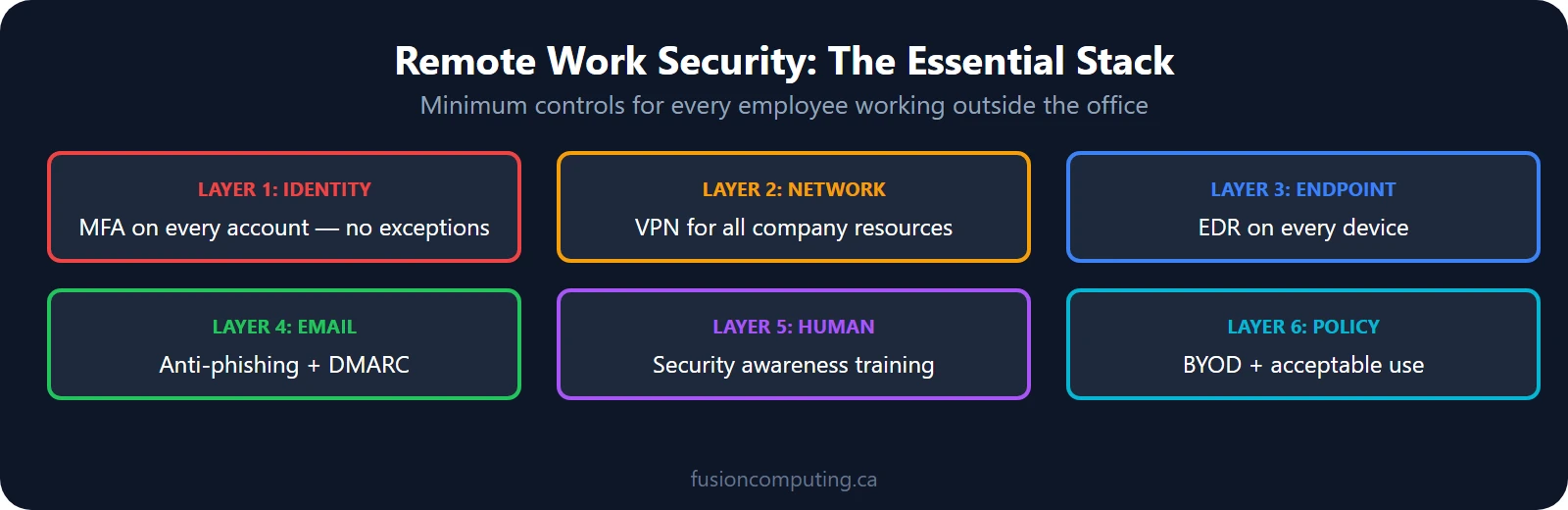
Remote work cybersecurity is the set of controls that protect business data when employees work outside the office – VPN, MFA on every account, EDR on every device, email security, security awareness training, and a documented BYOD policy. According to CIRA’s 2025 survey, 43% of Canadian organizations were targeted by cyberattacks, many exploiting remote work vulnerabilities.
TL;DR
Remote and hybrid workers face phishing, unsecured Wi-Fi, unpatched endpoints, and credential theft—43% of Canadian organizations were targeted by cyberattacks in 2025. Essential controls include MFA on every account, EDR on every device, VPN or zero-trust access, and security awareness training. Fusion Computing builds and manages complete remote-work security programs for Canadian businesses.
What threats do remote workers face in 2026? According to CIRA’s 2025 Cybersecurity Survey, 43% of Canadian organizations were targeted by cyberattacks
Cybersecurity for remote workers includes: mandatory multi-factor authentication (MFA), endpoint detection and response (EDR) on all devices, VPN or zero-trust network access (ZTNA), encrypted email and file sharing, security awareness training focused on phishing and social engineering, and mobile device management (MDM) for BYOD policies. Remote work security must protect data across home networks, personal devices, and public Wi-Fi.
TL;DR
Cybersecurity for remote workers requires MFA on all accounts, endpoint protection on every device, VPN or zero-trust network access, encrypted communications, and security awareness training. The shift to remote and hybrid work has expanded the attack surface—home networks, personal devices, and unsecured Wi-Fi create vulnerabilities that office-based security controls don’t cover.
Cybersecurity risks for remote and hybrid workers have evolved significantly since the pandemic era. Rather than the temporary Zoom vulnerabilities and hurried pandemic responses of the early pandemic, organizations now face sustained, sophisticated threats targeting distributed workforces. A 2024 Gartner report found that 74% of organizations experienced a security incident involving remote workers within the past 12 months. The average cost of a data breach now exceeds $4.5 million, and for organizations with hybrid workforces, that figure is typically 15-20% higher due to the difficulty of security enforcement across dispersed endpoints.
Fusion Computing is a CISSP-certified managed security services provider (MSSP) serving Canadian businesses since 2012. All security operations align to CIS Controls v8.1, with 24/7 managed detection and response, endpoint protection, and incident response — delivered from Canadian offices with all data stored in Canada.
The challenge isn’t new technology — it’s security visibility and control. When your workforce operates across home networks, office networks, and public Wi-Fi hotspots, traditional perimeter-based security models break down. Each employee’s personal router, personal laptop, and personal phone becomes a potential entry point if not properly secured and monitored.
A cybersecurity assessment is your first step to understanding where your organization stands against these evolved threats.
Zero Trust Architecture: The Foundation of Modern Remote Security
An effective remote security stack requires four layers: VPN or zero-trust network access, multi-factor authentication on all applications, endpoint detection and response on every device, and DNS filtering to block malicious domains. With 43% of Canadian organizations targeted by cyberattacks annually, remote workers operating outside these controls represent the highest-probability breach vector.
Securing remote workers requires enforcing MFA on all accounts, deploying endpoint detection and response (EDR) on every device, using a business VPN or zero-trust network access, managing devices with MDM software, and conducting regular phishing simulations. A written remote work security policy ensures every employee understands their responsibilities.
Zero Trust is no longer a buzzword — it’s the security architecture that works for hybrid environments. Unlike traditional network security models that assume “inside the network is safe,” Zero Trust assumes that every access request, whether from an office desk or a home office in Hamilton, must be verified and authorized before granting access to systems or data.
Zero Trust operates on five core principles: verify every user identity, validate device health before access, encrypt all data in transit and at rest, monitor and log all activity, and assume breach (plan for the worst). Rather than a single purchase, Zero Trust is an approach built from multiple complementary technologies working together.
Implementation starts with identity verification. Modern hybrid teams use multi-factor authentication (MFA) as a standard control — not optional. When combined with identity and access management (IAM) systems, you ensure that Jane working from home has the same authentication barriers as she would in your Toronto office.
The technical components supporting a Zero Trust model include:
- Identity and Access Management (IAM): Centralized authentication that verifies who you are, what you’re allowed to access, and logs every access attempt
- Multi-Factor Authentication (MFA): Requires a second verification method (phone code, authenticator app, biometric) beyond the password
- Encryption: All data encrypted at rest (on disk) and in transit (over networks)
- Endpoint Detection and Response (EDR): Continuous monitoring of employee devices for suspicious behavior
- Micronetwork Segmentation: Limiting what an authorized user can actually access based on role and device health
- Continuous Monitoring and Logging: Real-time visibility into who accessed what, when, and from where
Zero Trust is effective because it closes the gap that hybrid work creates. A compromised home Wi-Fi network doesn’t automatically compromise your company data if MFA, encryption, and device health checks are in place before access is granted.
Endpoint Protection for Remote and Hybrid Devices
Every laptop, tablet, and phone accessing company systems is an endpoint that must be protected. Traditional antivirus software — signature-based detection looking for known malware — is insufficient against today’s threats. Modern endpoint protection uses behavioral analysis, sandboxing, and machine learning to detect zero-day threats that haven’t been seen before.
For hybrid workforces, endpoint protection must include both passive detection (scanning files when accessed) and active protection (preventing suspicious processes from executing). When an employee’s device is stolen or lost, remote wiping capabilities ensure that company data is inaccessible to whoever took it.
Mobile Device Management (MDM) complements traditional endpoint protection. MDM lets your IT team enforce policies on company-issued phones and tablets — requiring PIN locks, disabling USB ports, remotely wiping devices if necessary, and logging which apps are installed. For BYOD (bring-your-own-device) policies, MDM can enforce security rules on personal devices that access company email or data.
The best practice for hybrid organizations is simple: issue dedicated work devices (laptops and phones) for work activities. Personal devices may handle email, but sensitive systems and data should require company-issued hardware with MDM and EDR deployed.
Learn more about protecting your organization: managed IT services from Fusion Computing include 24/7 endpoint monitoring and threat response.
Secure Remote Access: VPN vs. SASE vs. Zero Trust Network Access
Three distinct approaches exist for secure remote access, each with different strengths. Understanding the differences helps you choose the right tool for your hybrid team.
VPN (Virtual Private Network): Creates an encrypted tunnel between an employee’s device and your corporate network. All traffic from the home employee goes through this encrypted tunnel. VPNs work, but they have limitations. If the employee’s device is already compromised by malware, the VPN only encrypts the malicious traffic — it doesn’t stop it. Additionally, VPN concentrators (the servers that terminate all those encrypted tunnels) become a single point of failure and a high-value target for attackers.
SASE (Secure Access Service Edge): Moves security controls from on-premises hardware to cloud-based services. Rather than routing all traffic through an on-site VPN concentrator, traffic goes to cloud inspection points where it’s checked against threat intelligence, data loss prevention rules, and access controls before being allowed to reach applications. SASE is faster (cloud service closer to the user than on-site VPN), more scalable (cloud resources handle surges), and more flexible (works whether accessing SaaS apps, on-premises data, or hybrid cloud infrastructure).
Zero Trust Network Access (ZTNA, sometimes called “BeyondCorp model”): The modern approach, exemplified by companies like Cloudflare, Google, and others. Rather than routing all traffic through a VPN or SASE gateway, Zero Trust Network Access dynamically authorizes access to specific applications based on device health, user identity, and location. An employee working from home in Metro Vancouver gets encrypted access to the accounting system but not the development environment — based on their role. If that employee’s device fails a health check (missing security patch, malware detected), access is revoked until remediated.
For hybrid organizations, ZTNA is increasingly the gold standard because it matches how work actually happens — employees need access to different applications, often from different devices, from shifting locations. ZTNA adapts to that reality while maintaining security.
Multi-Factor Authentication and Identity Management
Passwords alone are insufficient for hybrid work security. According to the 2024 Verizon Data Breach Investigations Report, compromised credentials are involved in over 49% of all breaches. Multi-factor authentication (MFA) stops 99.9% of account takeover attacks, even when credentials are stolen.
For remote and hybrid teams, MFA should be:
- Universal: Required for all employees, all systems, all the time — not optional
- Phishing-resistant: Hardware security keys or authenticator apps are more secure than SMS (NIST SP 800-63B), which can be intercepted via SIM-swap attacks
- User-friendly: Seamless MFA (biometric unlock on phone, Windows Hello on laptop) is more secure than friction-inducing MFA because employees are less likely to disable it
- Logged and monitored: IT should track MFA usage and alert on anomalies (unusual locations, unusual times, impossible travel scenarios)
Identity management systems (IAM/SSO) act as the hub. Rather than managing passwords for dozens of applications separately, a single identity provider authenticates the user once (with MFA) and then grants access to approved applications. This reduces password sprawl, makes MFA deployment easier, and gives IT visibility into who has access to what.
A critical element: multi-factor authentication benefits are only realized when adopted universally. Even one unprotected account becomes the entry point that attackers exploit.
Security Awareness Training and the Human Element
According to the Canadian Centre for Cyber Security, people remain the #1 vulnerability in remote work security. Phishing emails, social engineering, and credential theft through deception account for the majority of successful attacks. When employees are distributed and less supervised, the temptation to click suspicious links or reuse passwords increases.
A complete security awareness program includes:
- Ongoing phishing training: Not just annual training. Monthly simulated phishing campaigns test whether employees actually recognize attacks. Employees who fall for simulated attacks should receive immediate retraining, not punishment.
- Password best practices: Use of a password manager is non-negotiable. Employees should use unique, complex passwords for each system — not short passwords they can remember. Password security assessment services can audit your organization’s practices.
- Safe browsing habits: Don’t click links in emails — instead, type the URL directly into the browser or use a bookmark. Don’t download files from unknown senders. Don’t share work files through personal email or cloud storage.
- Recognizing social engineering: Attackers call pretending to be IT support or a vendor, asking for passwords or access codes. Employees should be trained to never give credentials over the phone and to verify that the caller is actually who they claim to be.
- Physical security: Employees working in coffee shops or public areas should be aware that others can see their screen. Leaving a laptop unattended is a common vector for data theft or physical USB attacks.
- Handling of SIM-swap attacks: Employees should enable authentication protections with their phone carrier (PIN requirements, account freeze settings) to prevent attackers from hijacking their phone number for two-factor authentication bypass.
Effective training is practical, ongoing, and integrated into hiring and onboarding. It should be part of company culture — security awareness becomes everyone’s responsibility, not just the IT department’s.
Data Encryption and Loss Prevention
In a hybrid work environment, data leaves your office and travels over home Wi-Fi, public networks, and cloud services. Encryption is the control that ensures data remains confidential even when it moves.
Encryption at rest: Data stored on an employee’s laptop should be encrypted so that if the device is stolen, the thief can’t access the files. Full-disk encryption (like BitLocker on Windows or FileVault on Mac) is standard. Application-level encryption for sensitive files adds a second layer.
Encryption in transit: Data transmitted over networks (email, file transfers, API calls) should be encrypted. HTTPS for web traffic, TLS for email, VPN or ZTNA for network access — all ensure that someone monitoring the Wi-Fi network can’t see the data.
Data loss prevention (DLP): Technical controls that prevent sensitive data from leaving authorized systems. DLP can block email attachments containing credit card numbers, prevent USB drives from being connected to company devices, or flag when large amounts of data are being downloaded. DLP doesn’t prevent all data loss, but it catches careless mistakes and raises friction for deliberate theft.
The goal isn’t to prevent any data from existing on remote devices (that’s impractical), but to ensure that lost or stolen devices don’t become data breaches.
The Role of Managed IT Services and Continuous Monitoring
Hybrid work security can’t be built once and forgotten. Threats evolve, new vulnerabilities appear in operating systems and applications, employees join and leave, and devices proliferate. Continuous monitoring and incident response capabilities are essential.
A managed service provider (MSP) specializing in cybersecurity can:
- Patch management: Automatically deploy security updates to all devices as they’re released. Unpatched systems are the entry point for a large percentage of attacks.
- Endpoint Detection and Response (EDR): Deploy software on all endpoints that monitors for suspicious behavior (unusual network connections, process executions, file modifications) and alerts IT for investigation. EDR combined with threat intelligence catches attacks in progress.
- Security monitoring: Collect logs from firewalls, servers, cloud services, and endpoints into a Security Information and Event Management (SIEM) system. Automated rules and threat hunting identify attacks that automated tools miss.
- Incident response: When a breach is detected, a trained incident response team can contain the damage, preserve evidence, investigate root cause, and remediate the vulnerability. Fast response prevents small incidents from becoming catastrophic breaches.
- Vulnerability management: Regular scanning of your network and systems to find weaknesses before attackers do. Vulnerability assessment services identify and prioritize the risks that matter most to your business.
- Backup and disaster recovery: Regular backups of critical data stored separately from production systems. In the event of a ransomware attack, backups allow recovery without paying the attacker’s ransom.
Since 2012, Fusion Computing has provided managed IT and cybersecurity services to businesses across Toronto, Hamilton, and Metro Vancouver. Our CISSP-certified leadership and first-contact resolution approach means you work with experts who understand the risks specific to your industry.
Building a Hybrid Work Security Policy
A written policy provides the framework. It should cover:
- Device requirements: What types of devices are approved for work? Are personal devices allowed? What encryption and endpoint protection must be installed?
- Network requirements: Employees shouldn’t work on public Wi-Fi. If working in public, they should use a company VPN or ZTNA solution. Home Wi-Fi should be password-protected and ideally use WPA3 encryption.
- Data handling: What data can be stored on remote devices? What data requires encryption? What data requires additional approval from management?
- Application requirements: Which applications can access company data? Are personal cloud storage accounts (Google Drive, Dropbox) permitted for business files? What about messaging apps and collaboration tools?
- Authentication requirements: MFA is mandatory for all systems. Password managers should be used. Password reuse is prohibited.
- Incident reporting: What should an employee do if they suspect a phishing attack, if their device is lost, if they see suspicious activity? Clear escalation paths mean incidents are reported quickly.
- Consequences: Policy is only effective if enforced. Consequences for violations should be clear and consistently applied.
Policies are only effective if employees understand them and if IT enforces them. Regular communication, training, and occasional surprise audits maintain compliance.
Fusion Computing serves businesses across Toronto & GTA | Hamilton | Metro Vancouver
From Risk Assessment to Security Program
Developing a complete security program for hybrid work should start with an assessment. Where is your organization most vulnerable? What threats is your industry facing? What regulations apply to your business (PIPEDA, HIPAA, PCI-DSS)? What resources do you have to invest in security?
An IT business assessment starts with questions like these. Based on the answers, a security roadmap is created — prioritizing the most critical risks and phasing implementation based on business need and budget.
The assessment process itself often reveals surprising vulnerabilities. Maybe you don’t have multi-factor authentication. Maybe endpoint protection is installed but not actively monitored. Maybe security patches are 90 days behind. Maybe the CEO can’t access the company network remotely at all. Assessment data guides investment decisions and builds executive buy-in.
Hybrid work security isn’t a single purchase or implementation project — it’s an ongoing program. As new threats emerge, as your business grows, as new regulations appear, your security program must adapt.
Related Resources
Concerned About Your Cybersecurity Posture?
Find out where your organization stands with a free cybersecurity assessment from our CISSP-certified team.
Traditional VPN treats everything inside the network as trusted. Once an employee connects via VPN, they have broad network access. Zero Trust requires continuous verification of identity and device health, regardless of network location. If an employee’s device fails a security check, access is denied even over VPN. Zero Trust is more granular, more adaptive to hybrid work, and more effective against compromised accounts and devices.
Should remote employees use personal devices for work?
Personal devices add complexity and risk. Without endpoint protection and MDM deployed, personal devices are more likely to have malware, missing security patches, and weak passwords. The best practice is to issue dedicated work devices (laptops, phones) for all business activity. If BYOD is necessary, restrict it to email and non-sensitive systems, and require MDM enrollment so IT can enforce security policies and remotely wipe the device if it’s lost or the employee leaves.
How often should security awareness training happen?
Annual training is insufficient. Organizations should conduct monthly simulated phishing campaigns to maintain awareness and identify employees who need additional training. Quarterly refresher training on policy changes and emerging threats is also best practice. Simulated phishing should be used as a learning tool, not punishment — employees who fall for simulated attacks need retraining, not discipline. This approach works because frequent, low-stakes training is more effective than infrequent, high-stakes training.
What is SASE, and is it better than VPN?
SASE (Secure Access Service Edge) is a cloud-based alternative to on-premises VPN. Rather than routing all traffic through an on-site VPN concentrator, SASE routes traffic to cloud inspection points where security policies are applied before the user reaches their destination applications. SASE is faster (cloud closer to the user), more scalable (cloud resources handle peaks without upgrading hardware), and better suited to a world of SaaS applications and hybrid cloud infrastructure. For organizations using primarily SaaS tools, SASE is often preferable to traditional VPN.
How do we prevent phishing attacks when employees work remotely?
Phishing prevention requires multiple layers: email filtering (cloud-based email gateways scan for malicious links and attachments), user training (employees who recognize phishing are less likely to fall for it), and endpoint protection (if an employee does click a malicious link, their device blocks malware execution). Multi-factor authentication adds a final barrier — even if credentials are stolen via phishing, the attacker still can’t log in without the second authentication factor.
What should a hybrid work security incident response plan include?
An incident response plan should define who is responsible (incident response team), how incidents are reported (escalation path), what immediate actions should be taken (isolate the affected device, preserve evidence), who should be notified (management, legal, customers if data is exposed), and how recovery happens (restore from clean backup, patch the vulnerability). The plan should be documented, communicated to all employees, and tested at least annually through tabletop exercises or simulated incidents.
Fusion Computing serves Canadian businesses across:
Cybersecurity Services — Toronto · Cybersecurity Services — Hamilton · Cybersecurity Services — Vancouver
Related Resources
Strengthen Your Hybrid Work Security Today
Hybrid work security is complex. Let the experts at Fusion Computing guide your organization to a more secure posture. Our CISSP-certified team has protected Canadian businesses since 2012.
About the Author
Mike Pearlstein is CEO of Fusion Computing and holds the CISSP, the gold standard in cybersecurity certification. He has led Fusion’s managed IT and cybersecurity practice since 2012, serving Canadian businesses across Toronto, Hamilton, and Metro Vancouver. Fusion Computing provides first-contact resolution on IT and security issues, with 24/7 monitoring and expert guidance on hybrid work security challenges.


