
Your team’s probably already using AI, whether you’ve approved it or not. The real question isn’t if you should adopt AI tools. It’s which ones deserve your budget, your training time, and your trust.
We’ve helped dozens of mid-market companies roll out AI platforms across their organizations. Here’s what we’ve learned about Copilot vs ChatGPT vs Claude, and how to pick the right mix for your business.
KEY TAKEAWAYS
- Copilot is the right primary platform for most M365 businesses. It’s embedded in the tools your team already uses.
- ChatGPT fills the gaps: research, creative brainstorming, and anything outside the Microsoft ecosystem.
- Claude excels at long document analysis, careful reasoning, and producing writing that sounds like a real person wrote it. It’s the specialist pick for teams doing heavy reading and review work.
- One tool won’t cover everything. A primary platform plus a targeted second tool for specific gaps is what actually works in practice.
- Biggest risk? Employees choosing their own AI tools without governance, security review, or data handling policies in place.
Why this comparison matters right now
Copilot vs ChatGPT vs Claude: Microsoft Copilot integrates natively into Microsoft 365 apps for document drafting, email summarization, and data analysis. ChatGPT (OpenAI) is a general-purpose AI assistant strongest at content creation, brainstorming, and custom GPT workflows. Claude (Anthropic) excels at long-document analysis, code generation, and nuanced reasoning with strong safety guardrails. Each serves different enterprise use cases.
TL;DR
Microsoft Copilot is best for businesses already using Microsoft 365. it integrates directly into Word, Excel, Outlook, and Teams. ChatGPT (OpenAI) excels at general-purpose content generation and custom GPTs. Claude (Anthropic) leads in long-document analysis, coding, and safety-focused enterprise use. Most businesses benefit from combining two or more based on specific workflows.
According to Microsoft’s 2026 earnings data, only 3.3% of M365 commercial seats have paid Copilot licenses – meaning 96.7% of the market hasn’t moved yet.
The Copilot vs ChatGPT question isn’t academic anymore. AI adoption is accelerating faster than most IT teams can plan for. Stanford’s 2025 AI Index reports that 78% of organizations used AI in 2024, up from 55% the year before.
Fusion Computing provides AI readiness assessments, Microsoft Copilot deployment, and workflow automation for Canadian businesses. The company’s CISSP-certified team ensures AI adoption aligns with security requirements and compliance obligations from day one.
But here’s the problem. Most businesses don’t have a clear AI strategy. Employees are signing up for free tiers. Departments are buying paid licenses independently. Sensitive data is flowing into tools that haven’t been vetted by IT or legal.
Haven’t picked a direction yet? Your people have already picked one for you. A structured AI readiness assessment matters before you commit budget to any platform.
Copilot vs ChatGPT vs Claude: a side-by-side comparison
Microsoft Copilot integrates natively into M365 applications and keeps data within your tenant under enterprise agreements. ChatGPT excels at general-purpose generation and coding. Claude emphasizes nuanced reasoning and document analysis. For Canadian organizations, the PIPEDA compliance question. where does your data go when you submit a prompt?. narrows the enterprise choice to Copilot for most regulated environments.
Microsoft Copilot integrates directly into Microsoft 365 apps for workplace productivity. ChatGPT by OpenAI excels at general-purpose conversation and content generation. Claude by Anthropic focuses on safety, long-context analysis, and nuanced reasoning. For businesses already using Microsoft 365, Copilot offers the most seamless workflow integration.
Microsoft 365 Copilot is an AI assistant embedded directly into Word, Excel, PowerPoint, Outlook, and Teams that processes your business data within your M365 tenant. ChatGPT (OpenAI) is a general-purpose AI chatbot. Claude (Anthropic) excels at long-document analysis and nuanced reasoning. For Canadian businesses already on M365, Copilot is the primary platform because data stays in your tenant.
| Category | Microsoft Copilot | ChatGPT (OpenAI) | Claude (Anthropic) |
|---|---|---|---|
| Best for | Day-to-day productivity in M365 apps | Research, creative tasks, general Q&A | Long documents, analysis, careful writing |
| Ecosystem | Word, Excel, Outlook, Teams, PowerPoint | Standalone app, API, plugins | Standalone app, API |
| Pricing (per user/month) | $30 USD (M365 Copilot) | $20 USD (Plus) / $25 USD (Team) | $20 USD (Pro) / $25 USD (Team) |
| Data privacy | Enterprise data protection, Entra ID integration | Enterprise tier available, SOC 2 compliant | No training on inputs by default, SOC 2 |
| Learning curve | Low (lives inside familiar apps) | Low to medium (new interface) | Low to medium (new interface) |
| Biggest weakness | Limited outside M365, inconsistent Excel results | No M365 integration, data governance gaps on free tier | Smaller ecosystem, no native M365 tie-in |
| IT admin controls | Full M365 admin center, conditional access | Team/Enterprise admin dashboard | Team admin dashboard |
Why should Copilot be your primary AI platform?
When people ask us about Copilot vs ChatGPT, we don’t say Copilot is the smartest AI. It isn’t. But for most businesses running Microsoft 365, it’s the right starting point because it meets your team where they already work.
The adoption gap is real
Adoption is the number-one barrier to AI ROI, not the technology itself. When your team won’t use the tool, nothing else matters.
Copilot sits inside Word, Excel, Outlook, Teams, and PowerPoint. There’s no new app to open. No separate login. No context switching. Huge advantage when you’re trying to get 50 or 200 people to actually change how they work.
A Microsoft Work Trend Index report showed that employees who use Copilot directly in their workflow save an average of 14 minutes per day. Modest individually, sure. Across a 100-person company, those minutes add up to over 230 hours per month.
Why this bet is correct for most mid-market teams
Here’s the math that matters. If your company already pays for M365 Business Premium or E3/E5, you’re halfway there. Copilot plugs into your existing licensing, your existing security model, your existing compliance framework.
ChatGPT and Claude are separate tools. Different logins. Different data boundaries. Different admin consoles. Already-stretched IT teams don’t need more friction slowing down rollout and complicating governance.
None of this means Copilot is perfect. It’s not great at open-ended research. Its Excel capabilities are still maturing. And it won’t help much with tasks outside the Microsoft stack. But as a primary platform? For a company that runs on M365? That’s the right call.
U.S. paid AI subscriber share
Source: Appfigures insights, September 2024. U.S. mobile subscriber data.
ChatGPT dominates the paid subscriber market right now. But that’s consumer data. Enterprise data tells a different Copilot vs ChatGPT story, where M365 integration gives Copilot a distribution advantage that standalone tools can’t match. When your AI tool is already inside the apps people open every morning, adoption happens faster.
Where does ChatGPT fit in your stack?
In any Copilot vs ChatGPT comparison, this matters: ChatGPT isn’t going away, and it shouldn’t. Even if Copilot is your primary platform, there are tasks where ChatGPT is simply better.
Research and synthesis. Need to quickly understand a new regulation, summarize industry trends, or explore a topic you’re unfamiliar with? ChatGPT is excellent at broad research. It’s faster and more flexible than asking Copilot to search the web.
Creative brainstorming. Marketing copy, campaign ideas, naming exercises, content outlines. ChatGPT handles creative tasks well and gives you more control over tone and format than Copilot currently does.
Industry-specific work. Teams in professional services, finance, and accounting often need AI that can handle dense, specialized content without oversimplifying it. ChatGPT’s GPT-4 model handles technical material well when prompted correctly.
Quick one-off tasks. Reformatting data, writing a regex, explaining an error message, translating text. Anything that doesn’t live inside a Word document or Excel sheet? ChatGPT is often the faster path.
ChatGPT’s risk isn’t capability. Governance is the real concern. Employees using the free tier may have their conversations used for training. Pasting client data into prompts without an enterprise agreement creates a data handling risk your IT and legal teams need to address.
Book a Copilot Readiness Assessment
Where does Claude fit in your stack?
Copilot vs ChatGPT gets most of the attention, but Claude is earning a strong following among people who do a lot of writing, analysis, or document review.
Long document analysis. Claude can process documents up to 200,000 tokens in a single conversation. That’s roughly 150,000 words. Teams reviewing contracts, RFPs, policy documents, or compliance reports will find that Claude handles long-form input better than either Copilot or ChatGPT.
Writing quality. Claude produces text that reads more naturally than most AI tools. Output tends to be less formulaic, avoids the “AI voice” problem, and follows specific instructions about tone and audience more reliably.
Privacy-first design. Anthropic doesn’t train on user inputs by default. Businesses handling sensitive client data will notice that difference immediately. You don’t need an enterprise agreement just to get basic data protection.
Claude’s weakness? It’s a standalone tool with no native tie-in to M365 or Google Workspace. It won’t draft your emails or summarize your Teams meetings. For businesses that need structured AI adoption, Claude works best as a specialist tool for specific teams or use cases, not as the primary company-wide platform.
What about Google Gemini?
If your company runs on Google Workspace instead of Microsoft 365, Gemini deserves a serious look. Gemini is Google’s equivalent of Copilot: AI embedded directly into Gmail, Docs, Sheets, and Meet.
For M365 shops, though? Gemini doesn’t solve a problem your stack doesn’t already cover. Gemini is a strong tool in that ecosystem. Outside Google Workspace, it’s just another standalone AI assistant competing with ChatGPT and Claude.
Enough said on Gemini here. If you’re a Google Workspace company and want to explore Gemini, book an AI assessment and we’ll walk through the options with you.
How to decide: AI platform decision flowchart
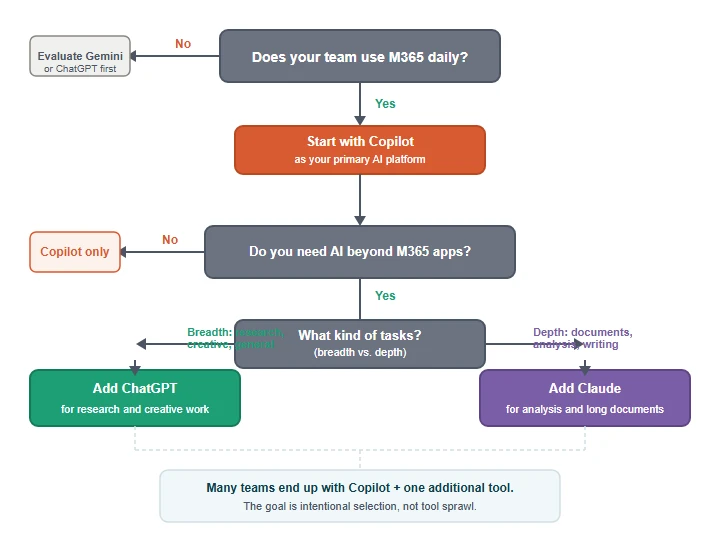
Building your AI decision framework
Don’t start with features. When you’re working through the Copilot vs ChatGPT decision, start with your team’s actual workflow. Here’s a practical framework we use with clients.
Step 1: Audit what your team already uses
Before you buy anything, find out what’s already happening. Shadow AI is real. Employees are already using free ChatGPT, Gemini, or other tools. Your IT support team should run a quick audit to identify what tools are in play and what data is flowing into them.
Step 2: Map tasks to platforms
Break your AI use cases into categories. The Copilot vs ChatGPT vs Claude question gets easier once you think in terms of tasks. Email drafting, meeting summaries, and document formatting? That’s Copilot territory. Market research, content creation, and brainstorming? ChatGPT. Contract review, compliance analysis, and technical writing? Claude.
Most companies don’t need all three. But they almost always need more than one.
Step 3: Set governance before you scale
This is where most rollouts fail. You need clear policies on what data can go into AI tools, which tools are approved, and who has access to paid tiers. Your cybersecurity team should be involved from day one. AI tools without governance are a data leak waiting to happen.
Step 4: Train, measure, iterate
Buy licenses for a pilot group. Track usage. Collect feedback. Measure whether people actually use the tool after week two. Then expand or adjust based on real data, not vendor promises.
Mike Pearlstein is CEO of Fusion Computing and holds the CISSP, the gold standard in cybersecurity certification. He has led Fusion’s managed IT and cybersecurity practice since 2012, serving Canadian businesses across Toronto, Hamilton, and Metro Vancouver.
Fusion Computing helps businesses deploy AI across Toronto & GTA | Hamilton | Metro Vancouver
Our recommendation
After working through the Copilot vs ChatGPT vs Claude question with dozens of clients, here’s what we’d suggest for most mid-market businesses running Microsoft 365.
Start with Copilot. Roll it out to a pilot group of 10 to 25 users. Focus on the departments that live in Outlook, Word, and Teams. Measure adoption after 30 days.
Add ChatGPT Team licenses for marketing, research, and creative roles that need a more flexible tool. Set clear data handling policies first.
Consider Claude for legal, compliance, or executive teams that work with long documents and need high-quality written output.
Skip the free tiers. They’re fine for personal use. For business use, the data governance gaps aren’t worth the savings.
Not sure where to start? We’ve built a structured process for exactly this Copilot vs ChatGPT decision. Book a free AI readiness assessment and we’ll map your team’s workflows to the right tools, set up governance guardrails, and build a rollout plan that actually sticks.
Can we just use ChatGPT for everything instead of paying for Copilot?
Is it safe to use AI tools with client data?
How much does it cost to roll out Copilot across a company?
What’s the biggest mistake companies make with AI adoption?
Should we wait for AI tools to mature before investing?
Related Services & Resources
Ready to Put AI to Work for Your Business?
Our AI readiness assessment identifies the highest-impact opportunities for your organization.
About the author
This post was written by the Fusion Computing team. We’ve helped businesses across Toronto, Hamilton, and Vancouver navigate IT decisions (including the Copilot vs ChatGPT question) since 2012. If your team wants a structured approach to AI platform selection, get in touch.
Fusion Computing serves Canadian businesses across:
AI Services — Toronto · AI Services — Hamilton · AI Services — Vancouver


