
Quick Answer: IT procurement is the end-to-end process of scoping, buying, deploying, and reviewing the devices, software, and services a business runs on. A mature IT procurement process for a Canadian SMB runs in five steps. First, an annual requirements review tied to business goals. Second, sourcing with at least two vendor comparisons. Third, a total-cost-of-ownership analysis rather than sticker price. Fourth, deployment against documented acceptance criteria. Fifth, a quarterly renewal and usage review.
Across Fusion Computing’s own Canadian client base (anonymized client data, reviewed July 2026), most SMBs skip steps 1, 3, and 5. That gap is why IT budgets drift 15-25% over three years.
Every dollar your business spends on IT is a bet. You’re betting that the laptop, the software licence, or the firewall appliance will deliver more value than it costs. But here’s the problem: most Canadian companies don’t treat IT purchasing like the strategic decision it actually is. They react to problems, buy whatever’s available, and hope it all works together.
That’s impulse shopping with a corporate credit card.
Whether you’re running a 35-person firm or a 200-seat enterprise, the way you buy laptops and licences shapes everything from productivity to security posture. A structured approach to IT procurement doesn’t just save money. It reduces risk. It shortens deployment timelines and keeps your roadmap aligned with where you’re actually headed.
In this post, we’ll walk through what information technology procurement really means, how to build a repeatable process that works, and why Canadian businesses face unique considerations that off-the-shelf guides don’t cover. We’ll also share the procurement checklist we use with our own clients.
If you already know you need outside help, move from research to execution with our IT procurement services page, or book a consultation and we will scope the stack, vendor, and lifecycle gaps with you first. Most of those calls run 30 minutes.
KEY TAKEAWAYS
- IT procurement is lifecycle management: planning, sourcing, deploying, maintaining, and retiring every asset you own.
- Always compare at least two vendors, and request total cost of ownership (TCO) rather than sticker price.
- Review renewals quarterly (software, licences, warranties) before auto-renewal locks you in.
- Spreading hardware costs across a refresh cycle prevents the CA$40K surprise quarter when everything ages out at once.
- Your MSP’s vendor relationships often get you better pricing than going direct. Ask before you order.
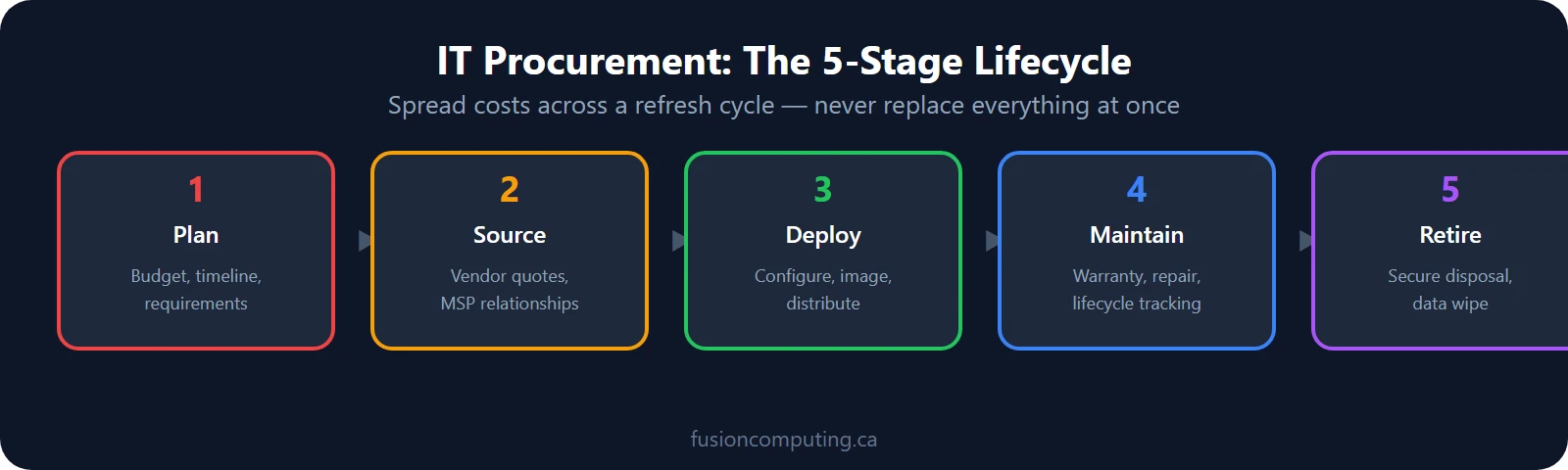
Most IT purchasing is reactive by default. A laptop breaks, you replace it. A license renews, you approve it. Devices age until they fail in the same quarter because nobody tracked the 3-to-4-year refresh cycle. The difference between that pattern and a managed IT procurement process shows up most clearly in budget predictability and how often you’re caught off guard.
What is information technology procurement?
A mature IT procurement process for a Canadian SMB runs in five steps. An annual requirements review tied to business goals, sourcing with at least two vendor comparisons, structured evaluation, deployment, and a post-purchase review close the loop so spend maps to outcomes. Source: Fusion Computing IT procurement framework, 2026.

The answer depends on your starting point. A 20-person firm with aging hardware and scattered SaaS subscriptions approaches procurement differently than a 100-person business standardized on Microsoft 365 and a managed security stack. The process below covers the common pattern. The variables that matter most for your situation surface at Step 1.
Procurement discipline removes two of the ten failures Canadian SMBs carry most often: vendor sprawl and unplanned hardware refresh. The other eight are catalogued in our guide to the most common IT problems in business.
What most procurement guides skip: the decisions you make today create constraints three years from now. Vendor lock-in, incompatible device generations, subscription bloat from tools that were “just a pilot”. In one Toronto stack we inherited, 3 of those pilots were still billing 4 years later. These are procurement outcomes. The steps below are designed to prevent them.
Fusion Computing is a Canadian-owned managed IT services and cybersecurity provider serving businesses with 10 to 150 employees since 2012. With a 93% first-contact resolution rate and CISSP-led security leadership, Fusion Computing delivers monitoring, help desk and security services aligned to CIS Controls v8.1.
A mature procurement strategy covers requirements analysis, vendor evaluation, and contract negotiation. It also covers licence management, deployment planning, and lifecycle tracking across all 12 months of the year. Each of those steps matters because skipping even one creates downstream problems.
According to Forrester’s February 2026 forecast, global technology spending will reach US$5.6 trillion in 2026, up a record 7.8%. That’s a staggering number, and it reflects how central IT has become to every business function.
But spending more doesn’t mean spending well. Many Canadian organizations lack a formal procurement policy, which means purchasing decisions happen ad hoc. Departments buy their own tools. Renewals auto-charge without review. Hardware ages past its useful life because nobody’s tracking it.
The gap between “we buy IT stuff” and “we have a procurement function” is where most of the waste lives. For a 50-seat Ontario business that gap is usually worth 5 figures a year. Closing it starts with understanding the process itself.
A 5-step IT procurement process for growing businesses
According to Statistics Canada’s survey of cyber security and cybercrime (2024 release), small and medium businesses absorb a disproportionate share of incident impact. They also run the leanest security teams. Procurement is the first gate where that gap either widens or closes, which is why CIS Controls v8.1 puts an approved inventory ahead of tooling.

The most common place businesses lose money in IT is the absence of a process at all. Without a defined procurement process, purchasing decisions default to whoever has the most urgency rather than the most information. The 5 steps below exist to fix that specific problem.
A structured procurement process doesn’t need to be complicated. It needs to be consistent. Here are the 5 steps we walk our Canadian clients through, whether they’re replacing a single server or overhauling their entire stack.
Step 1: Assess current state and define requirements
You can’t buy the right equipment if you don’t know what you already have. Start with a full inventory of every device, licence and subscription, right down to the 2 laptops in the storage closet. Document what’s working and what’s failing. Then document what’s redundant and what’s missing.
This isn’t just an asset list. It’s a gap analysis. You need to understand where your current environment falls short of what the business actually needs. A 35-person firm that’s growing to 80 has very different requirements than one that’s stable.
We typically conduct this through our IT procurement services assessment, which maps every device, licence, and contract to its business function. The output is a prioritized list of what to change, usually 15 to 30 line items for a Canadian SMB.
Don’t skip this step. It’s tempting to jump straight to “we need new laptops,” but the assessment almost always reveals surprises. Duplicate licences still billing 6 months after someone left. Forgotten subscriptions. Hardware that’s one firmware update away from end-of-support.
Step 2: Research vendors and evaluate options
Once you know what you need, you can start evaluating who can provide it. This is where technology procurement gets interesting, because the Canadian vendor landscape is enormous and not every option fits every business.
For hardware, you’re comparing OEMs against channel partners and refurbished suppliers. For software, you’re weighing on-premise vs. cloud, per-user vs. per-device licensing, and annual vs. monthly billing. For services, you’re weighing an MSP against consultants and against hiring a second internal admin at Ontario salary rates.
Build a scoring matrix that weighs factors beyond price. Consider support quality, integration with your existing Microsoft 365 stack, the vendor’s financial stability, and their roadmap. A tool that’s cheap today but gets acquired and sunset next year isn’t a deal.
At this stage, it’s worth talking to a procurement partner who can access volume pricing you wouldn’t get on your own. The difference between retail and channel pricing on enterprise hardware is often 15-30%.
Step 3: Negotiate contracts and licensing
Negotiation isn’t just about getting a lower price. It’s about structuring agreements that protect your business and give you flexibility as you grow from 40 seats to 80.
Pay attention to auto-renewal clauses. Many SaaS contracts renew automatically at higher rates if you don’t provide written notice 60-90 days before expiry. Calendar those dates. Put reminders in place.
Negotiate volume licensing where possible. Microsoft 365, for example, offers significant per-seat discounts at certain thresholds. If you’re at 45 seats and planning to hire, it may make sense to license for 50 upfront.
Don’t forget exit terms. What happens if you want to switch vendors? Can you export your data inside 30 days? Is there a termination fee? These questions are much easier to answer before you sign than after.
NEGOTIATION CHECKPOINTS
- Auto-renewal notice window: 60 to 90 days before expiry, on your calendar.
- Volume thresholds: licence for planned headcount.
- Exit terms: data export path and termination fee confirmed in writing.
Step 4: Deploy and integrate
Purchasing is only half the job. Deployment determines whether that investment actually delivers value. A new firewall sitting in a box for 3 weeks isn’t protecting anything.
Create a deployment timeline with clear milestones. Assign ownership for each step: imaging, configuration, testing, user training and rollout. If you’re replacing existing systems, plan the transition in 2 waves so there’s minimal disruption.
Integration matters just as much as deployment. That new CRM needs to talk to Microsoft 365, your accounting software and your reporting tools. Plan those connections before go-live.
This is another area where a managed procurement partner adds value. They’ve deployed the same models hundreds of times. They know the gotchas. They’ve already built the automation scripts.
Step 5: Track lifecycle and optimize
The procurement process doesn’t end at deployment. Every asset has a lifecycle, and managing that lifecycle over 3 to 5 years is what separates organizations that get value from their spending from those that waste it.
According to Zylo’s 2026 SaaS Management Index, 46% of SaaS licenses go completely unused, representing US$19.8 million in average waste per enterprise. That stat should make every CFO’s eye twitch.
Set up quarterly reviews of your technology stack. Check utilization rates. Identify licenses that aren’t being used. Flag hardware that’s approaching end-of-life. Build a replacement calendar so you’re never scrambling to replace 40 laptops at once.
Lifecycle tracking also feeds back into Step 1. The data you collect during optimization informs your next procurement cycle, making each round smarter than the last.
IT procurement strategy: buying for the long term
According to Okta’s 2025 Businesses at Work report, the average organization now runs 101 SaaS applications. A procurement strategy exists to keep that number honest: every new subscription should displace, consolidate, or measurably out-earn the tool it sits beside, or it shouldn’t get bought.
A procurement strategy is different from a procurement process. The process is how you buy. The strategy is why you buy what you buy, and it should survive at least 3 budget cycles.
Start with total cost of ownership
Start with total cost of ownership (TCO). That CA$800 laptop looks cheaper than the CA$1,200 one until you factor in the extended warranty, the RAM upgrade, the docking station, and the fact that it’ll need replacing a year earlier. TCO analysis changes the math on almost every purchase.
Consolidate vendors deliberately
Vendor consolidation is another strategic lever. If you’re using 4 different vendors for endpoint protection, email security, backup and identity management, you’re paying 4 sets of overhead. Consolidating to a platform that covers multiple functions often reduces cost and complexity simultaneously.
Rationalize the SaaS stack
SaaS rationalization deserves its own conversation. Those 101 applications mean 101 subscriptions, 101 potential security gaps, and 101 vendor relationships to manage. Cutting that number by even 20% can free up significant budget and reduce your attack surface.
Buy for where the business is headed
Growth belongs in the same conversation. If you expect to open a second office or hire 30 people over the next 18 months, your purchasing has to reflect that. Buying for today’s headcount means you’ll be scrambling again in six months.
The best IT procurement strategies we’ve seen tie technology spending directly to business objectives. They aren’t shopping lists. They’re roadmaps that connect every purchase to a measurable outcome, reviewed at least twice a year.
Procurement best practices for Canadian businesses
Statistics Canada’s Survey of Digital Technology and Internet Use (2024) shows Canadian SMBs spending a growing share of operating budgets on cloud, SaaS, and security tooling. Licence sprawl and unmanaged vendor agreements remain the top sources of overspend. The six practices below target the parts of that problem that are specifically Canadian.

While the fundamentals of procurement best practices are universal, Canadian businesses face 6 specific considerations that change how procurement should work.
- Plan for CAD pricing volatility. Many enterprise software vendors price in USD. When the Canadian dollar weakens, your renewal costs go up even if the sticker price doesn’t change. Build a currency buffer into your budget, and negotiate CAD-denominated contracts where possible.
- Prioritize Canadian data residency. Not every cloud vendor offers Canadian data centres. If you’re subject to provincial privacy legislation or work with government clients, you may need to ensure your data stays in Canada. Ask about data residency before signing.
- Factor in cross-border shipping timelines. Hardware sourced from US distributors can get delayed at the border. Tariff changes and customs classification issues add unpredictability. Work with vendors who maintain Canadian warehouse inventory or partner with Canadian distributors.
- Align procurement cycles with fiscal year planning. Many Canadian businesses run on a calendar fiscal year. Aligning your major technology purchases with your annual budgeting cycle prevents the mid-year scramble that leads to emergency spending at inflated prices.
- Use SR&ED and provincial digital-adoption funding. The Scientific Research and Experimental Development tax incentive still offsets qualifying technology work, and several provinces run their own digital-adoption grants. The federal CDAP grant closed to new applicants in 2024, so treat older guides that recommend it as dated. Either way, keep procurement records detailed enough to support a claim.
- Build relationships with Canadian channel partners. A local partner who understands Canadian tax implications, provincial compliance requirements and domestic supply chains will consistently outperform a generic US-based reseller on service quality and relevance.
Working through this for your business?
Mike Pearlstein, CISSP, leads the Fusion Computing team that helps Canadian SMBs evaluate vendors, negotiate contracts or build a procurement playbook. Free 30-minute consult, we will tell you what we would do.
IT procurement policy: why does your business need one?
The Canadian Centre for Cyber Security’s baseline controls (2024) put an approved software and hardware inventory near the top of the list for small and medium organizations. A procurement policy is how that inventory stays true after week one. Without a gate on what gets bought, no inventory survives contact with a growing team.
A procurement policy is a documented set of rules that governs how your organization evaluates, approves, and purchases technology. Ours runs to 2 pages. If you don’t have one, you’re flying blind.
The biggest risk of operating without a policy is shadow IT. When there’s no clear process for requesting technology, employees find their own solutions. They sign up for free trials that auto-convert to paid plans. They store company data in personal Dropbox accounts. They install browser extensions that haven’t been vetted for security.
A good procurement policy addresses this by creating a clear, fast approval workflow. It shouldn’t take three weeks and seven signatures to buy a CA$50/month tool. But it should require that someone with technical and security knowledge reviews the request before the credit card comes out.
What the policy should cover
Your policy should define spending thresholds (who can approve what), preferred vendor lists, security requirements for new software, and data classification rules aligned to PIPEDA. It should be short enough that people actually read it and practical enough that they follow it.
The policy should also tie into your broader IT governance framework. If you’ve completed an IT business consultation, use those findings to inform your procurement guardrails. The assessment data tells you where your gaps sit against CIS Controls v8.1, and the policy prevents you from making those gaps worse.
We’ve seen organizations cut shadow IT by 60% within 6 months of implementing a clear procurement policy. The key is making the approved path faster and easier than the workaround.
How do managed service providers approach technology purchasing?
Across our 40-plus Canadian client fleets, we benchmarked consolidated channel purchasing at 18 to 25% savings per hardware unit versus retail pricing, with 22% the average. FC internal benchmark from Q1 2026, drawn from anonymized client data across Ontario and British Columbia engagements. The sections below show where that margin comes from.

There’s a fundamental difference between buying technology yourself and having a managed service provider handle procurement on your behalf. It’s not just about convenience. It’s about access, expertise, and the economics of buying for 40-plus Canadian fleets at once.
Here’s a real example, anonymized to role: the COO of a 35-person Toronto engineering firm. When we met them, they were buying laptops from Best Buy, managing their own Microsoft licensing, and replacing hardware only when it died. Their annual IT spend was scattered across a dozen vendors with no volume buying power.
Over four years, they grew to 205 employees across three locations. During that growth, we handled all their IT procurement. We consolidated their hardware purchasing through enterprise channels, saving 22% on average per unit. We right-sized their Microsoft 365 licensing, eliminating duplicate subscriptions and moving to a tier that matched their actual usage.
We also built a lifecycle management system that tracked every asset from purchase to retirement. When a laptop hit its 3-year mark, a replacement was already in the pipeline. No emergency orders. No productivity lost to failing equipment.
An MSP brings purchasing power that a mid-size Canadian business simply can’t match on its own. We’re buying for hundreds of clients, which means we’re negotiating at volumes that unlock pricing tiers most individual companies will never see.
But it’s more than just price. An MSP integrates procurement with deployment, security, and ongoing support. When we buy a firewall for an Ontario client, it arrives pre-configured, tested, and ready for installation. There’s no gap between purchasing and protection.
That integration is what transforms technology procurement from a cost centre into a competitive advantage.
“Fusion Computing has been the best IT Services provider we’ve ever had. Their managed IT services offering covers all 4 of our JP Motors locations bumper to bumper.”
PIPEDA, data residency, and compliance in technology procurement
Under PIPEDA (Office of the Privacy Commissioner of Canada, 2025), your organization stays accountable for personal information even after a vendor takes custody of it. That single principle makes vendor due diligence a legal requirement for every Canadian technology purchase.
Canadian businesses operate under a regulatory framework, led by PIPEDA, that directly shapes how they should approach technology procurement. Ignoring compliance during procurement creates expensive problems later.
PIPEDA (the Personal Information Protection and Electronic Documents Act) governs how private-sector organizations collect, use, and disclose personal information. When you’re procuring new software or cloud services, you need to assess whether the vendor’s data handling practices align with PIPEDA requirements. Our guide to PIPEDA compliance for small businesses covers the vendor-assessment side in depth.
Bill C-27, which proposed to replace PIPEDA with the Consumer Privacy Protection Act, died on the Order Paper when Parliament was prorogued in January 2025. PIPEDA therefore remains the governing federal statute until a successor bill passes.
On the security side, Bill C-8 has received royal assent, and once its Critical Cyber Systems Protection Act provisions are brought into force, security obligations will flow down through vendor contracts for federally regulated sectors. Smart procurement planning accounts for both.
Provincial legislation adds another layer. Ontario’s PHIPA governs health information. British Columbia’s PIPA and Alberta’s PIPA have their own requirements. If you’re operating in multiple provinces, your procurement process needs to account for the strictest applicable standard.
DATA RESIDENCY QUICK CHECK
- Where is production data stored, and where do backups replicate?
- Does the vendor offer a Canadian region, and does your contract pin it?
- Who can access the data under the US CLOUD Act if the vendor is US-parented?
Data residency narrows your vendor list
Data residency is particularly relevant for cloud procurement. Not all vendors offer Canadian-hosted instances. If your compliance obligations require data to remain in Canada, this narrows your vendor options significantly. It’s a filter that should be applied early in the evaluation process rather than discovered during a compliance audit.
Provincial privacy regulators, including the Information and Privacy Commissioner of Ontario and the Office of the Information and Privacy Commissioner for British Columbia, have published guidance requiring documented data-destruction and vendor-management practices. The guidance applies to any organization holding personal information. Treating procurement as a documented, gated process is now a regulatory expectation in Canada as well as a cost-control exercise.
For businesses that need help navigating the intersection of procurement and compliance, our cybersecurity services team works alongside our procurement specialists to vet vendors against Canadian regulatory requirements before any contract is signed.
Technology purchasing checklist
Use this checklist before any major technology purchase. It’s the same framework we use with our clients.
- Inventory complete: All existing hardware, software, and subscriptions documented.
- Requirements defined: Business needs clearly mapped to technology capabilities.
- Budget approved: TCO calculated including deployment, training, and ongoing costs.
- Vendors evaluated: Minimum three options scored against weighted criteria.
- Security reviewed: Vendor security posture, data handling, and compliance confirmed.
- Data residency confirmed: Canadian hosting verified where required by regulation.
- Contract terms negotiated: Auto-renewal, exit clauses, and SLAs reviewed.
- Licensing optimized: Correct tier and seat count confirmed, no over- or under-provisioning.
- Deployment plan created: Timeline, ownership, testing, and rollback procedures documented.
- Lifecycle tracking active: Asset entered into management system with renewal and EOL dates.
- Stakeholder sign-off: IT, finance, and affected department heads have approved.
Free download
The Managed IT Provider RFP Kit and Scorecard
The question set we use to run a real IT provider comparison, plus the weighted scorecard for ranking responses side by side. Use it to run Step 2 above without building an RFP from scratch.
No sales call required. Prefer to talk it through? Book a consultation instead.
CISSP-led since 2012 · 4.9★ across 48 verified Google reviews · Canadian-owned and operated
What is IT procurement?
Why is an IT procurement strategy important for small businesses?
How much do Canadian businesses typically waste on unused software?
What should an IT procurement policy include?
How does PIPEDA affect IT procurement in Canada?
Should we buy IT equipment directly or through an MSP?
What’s the difference between IT procurement and IT asset management?
How often should we review our IT procurement strategy?
What is shadow IT and how does procurement policy prevent it?
Can IT procurement help with cybersecurity?
How much does MSP-managed IT procurement cost?
Do we still need a formal procurement process with only 15 employees?
Software Procurement Best Practices: Licensing, SaaS, and Vendor Lock-In
Zylo’s 2026 SaaS Management Index pegs licence utilization at roughly half of paid seats, which means a 40-seat tool is often doing 22 seats of work. The five software procurement practices below exist to claw that margin back before the next renewal locks it in.
Software procurement is where most Canadian businesses leak money. The pattern is familiar: someone signs up for a SaaS tool with a credit card, it gets adopted by a team, and 18 months later nobody remembers who owns the subscription. But it’s still billing CA$50/user/month for 40 users who stopped using it 6 months ago.
Five software procurement practices that stop the leak
Software procurement best practices that prevent this:
- Centralize purchasing. Every software acquisition goes through one approval process. No shadow IT.
- Annual license audit. Review every subscription quarterly. Kill what’s unused. Right-size what’s over-provisioned.
- Negotiate exit clauses. Before signing any multi-year SaaS contract, negotiate a data export clause and a termination-for-convenience provision.
- Security review before purchase. Every new tool needs a security questionnaire: where is data stored, who has access, is it encrypted at rest, does it support SSO?
- Microsoft consolidation. Many businesses pay for 4-5 tools that Microsoft 365 already includes (Teams, SharePoint, Power Automate, Defender). Our Virtual CIO services team maps your tool stack against your existing licenses to eliminate overlap.
Hardware Procurement Best Practices: Laptops, Servers, and Network Infrastructure

Hardware procurement follows different rules than software. A SaaS subscription can be cancelled in 30 days; a server refresh takes 6 to 12 months to plan and execute properly. The cost of getting hardware procurement wrong shows up in unplanned downtime, early replacements and support contracts for equipment nobody wants to maintain.
Build a hardware refresh cycle
Most Canadian SMBs run hardware until it fails. That reactive approach costs more than a planned refresh cycle because emergency replacements carry premium pricing and rushed procurement skips compatibility review. Failed hardware also takes staff offline at the worst time. A structured hardware procurement strategy defines refresh windows for each asset class.
| Asset class | Refresh window | Why that window |
|---|---|---|
| Laptops and desktops | 3 to 4 years | After year 4, warranty costs and performance drag typically exceed the cost of replacement. |
| Servers | 5 to 7 years | Aligned with vendor end-of-support dates; unpatched servers are a liability most cyber insurers flag during underwriting. |
| Network infrastructure (switches, firewalls, access points) | 5 to 7 years | Replace when throughput or security capabilities fall behind requirements, or when firmware updates stop. |
| UPS and power protection | 4 to 5 years (batteries every 2 to 3) | Battery chemistry degrades on a fixed clock regardless of load. |
Build this schedule into your IT procurement policy so replacement decisions happen 2 quarters before equipment fails.
Standardize your hardware stack
Every hardware model you support is a support contract, a spare-parts decision, and a driver library. Organizations that let departments buy whatever laptop looked good in a review accumulate a support burden disproportionate to their team size. We have walked into 30-person Ontario offices running 11 laptop models. A standardized hardware procurement strategy means:
- IT can deploy and repair units without researching each model individually.
- Spare parts and warranty coverage consolidate to a smaller vendor set.
- Imaging and provisioning time drops when you deploy the same models repeatedly.
- Users get consistent performance and a consistent support experience.
For most Canadian SMBs, this means one or two preferred laptop models for different roles and one server family. Pick a single network hardware vendor; Cisco Meraki, Fortinet and Ubiquiti are the common choices at SMB scale. Deviations require explicit approval and a documented support justification.
Hardware procurement through an MSP vs direct purchasing
Direct purchasing gives you flexibility but loses the efficiency advantages of volume relationships. Procurement through an MSP typically means lower unit pricing through volume purchasing agreements with Dell, Lenovo, HP and Cisco. Pricing unavailable to single-company buyers.
Hardware arrives pre-configured and ready to deploy: new laptops go to users same day rather than sitting on an IT desk waiting for setup. Centralized warranty tracking means you know 90 days ahead when coverage expires, so you plan replacements rather than discover the gap during a failure.
For Canadian businesses, MSP-managed hardware procurement also addresses a practical logistics problem: hardware sourced directly from US distributors can face border delays and tariff uncertainty. An MSP with Canadian warehouse relationships sources equipment domestically, cutting lead times significantly and removing customs complications from your critical refreshes.
If your organization purchases more than 10 hardware units per year, the pricing and operational advantages of MSP-managed procurement typically outweigh the convenience of going direct.
Hardware vs software procurement: how do the strategies differ?
According to Forrester’s February 2026 global technology forecast, nearly two-thirds of tech spending growth over the next five years will come from software and computer equipment, especially servers. Those two categories dominate the budget and they fail in opposite ways. Software leaks money every month until someone cancels it. Hardware commits the money once and locks the mistake in for three to five years.
A hardware procurement strategy and a software procurement strategy answer different questions. Hardware asks when to replace. Software asks whether to keep paying. Running both through one undifferentiated process is how a 60-person Ontario firm ends up with a tidy laptop refresh calendar and a subscription list nobody has opened since 2024.
| Dimension | Hardware procurement strategy | Software procurement strategy |
|---|---|---|
| Spend shape | Lumpy capital spend, one heavy quarter every 3 to 5 years. | Recurring operating spend, billed monthly or annually. |
| Decision trigger | Asset age, warranty expiry, vendor end-of-support date. | Renewal date, seat-count drift, overlap with Microsoft 365. |
| Where money leaks | Emergency replacements bought at premium pricing. | Unused seats. Zylo puts these at 46% of paid SaaS licences. |
| Review cadence | Annually, against the refresh calendar. | Quarterly, against actual sign-in data. |
| Exit cost | Disposal, data sanitization, residual resale value. | Data export path and termination-for-convenience terms. |
| Canadian wrinkle | Border delays and tariff classification on US-sourced units. | USD-priced renewals that climb when the CAD weakens. |
What changes in practice
The practical split is a calendar problem. Hardware belongs on an annual planning cycle tied to your fiscal year, because a 3-to-4-year laptop cycle is predictable years ahead. Software belongs on a quarterly cycle tied to renewal dates, because a 40-seat licence can quietly become a 22-seat need inside two quarters.
The security review differs too. For hardware, the question is firmware support life and whether the vendor still ships patches. For software, the question is where the data sits, whether Canadian residency is contractually pinned, and whether the tool supports single sign-on through Entra ID.
Across our Canadian client base we run these as two separate review meetings with two separate owners. Finance leads the hardware calendar because it is a capital conversation. The service desk leads the software audit because it holds the sign-in telemetry that proves which seats are dead.
Mike Pearlstein, CISSP
Mike is the founder and president of Fusion Computing. He leads the team responsible for IT procurement, infrastructure strategy and cybersecurity for Canadian businesses ranging from 10 to 150 employees. He holds the CISSP certification and has spent over two decades helping organizations align their technology investments with business outcomes.
Next steps
Ready to stop guessing? Start with the checklist above. Then see how our IT procurement services source, negotiate and manage the full stack for Canadian businesses.
Want to talk through your situation? Book a consultation and we will show you, in 30 minutes, where your current approach is leaking money.


