
Cybersecurity isn’t just an IT concern; it’s something every business owner should understand. Below, we outline the key security tools we recommend, why they’re essential, and the risks of not having them. These baseline tools help modern businesses operate safely and smoothly.
But protecting your business goes beyond just software. Fusion Computing provides complete IT management, covering vendor management, budgeting, strategic planning, virtual CIO support, and compliance consulting. These services complement our technical solutions to help your business grow securely and efficiently.
All the tools below are included in Fusion’s MSSP (Managed Security Service Provider) offering, with fixed per-user pricing and 24/7 support for predictable budgeting. Use our Online Calculator to easily compare the cost of in-house IT with our managed plan. Ready to get started? Let’s secure your business together.

For a broader service view, see how Fusion delivers IT support across help desk coverage, monitoring, patching, Microsoft 365 administration, security oversight, and vendor coordination.
KEY TAKEAWAYS
- Fusion’s tool stack: NinjaOne (RMM), ConnectWise (PSA), Huntress (EDR), KeeperSec (PAM), Fortinet (firewall).
- Every tool is selected for integration, not just features. The stack works as a system, not a collection of products.
Mike Pearlstein is CEO of Fusion Computing and holds the CISSP, the gold standard in cybersecurity certification. He has led Fusion’s managed IT and cybersecurity practice since 2012, serving Canadian businesses across Toronto, Hamilton, and Metro Vancouver.
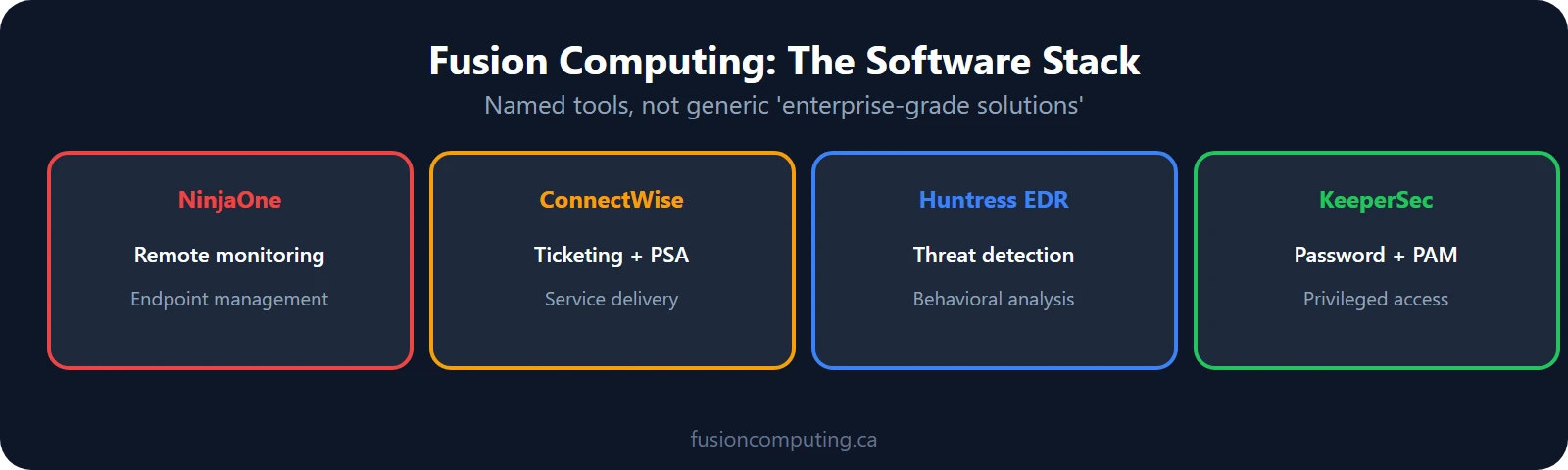
Fusion Computing’s software stack consists of NinjaOne (remote monitoring and management), ConnectWise (ticketing and service delivery), Huntress EDR (endpoint detection and response), KeeperSec (privileged access management), and Fortinet (network security). Every tool is named because naming them proves we use enterprise-grade platforms, not generic solutions.
Fusion’s Cybersecurity Toolbox
Managed IT providers use remote monitoring and management (RMM) platforms, professional services automation (PSA) ticketing systems, endpoint detection and response (EDR) tools, backup and disaster recovery software, patch management systems, and network monitoring dashboards. The specific toolset varies by provider, but integration between platforms is what enables proactive rather than reactive support.
Next-Generation Firewall (NGFW)
- What It Does: Stops unwanted internet traffic with advanced security features like deep inspection, intrusion prevention, and application control.
- Why You Need It: Cyber threats today are more complex. NGFW protects against modern attacks that standard firewalls can’t stop.
- Risk If Missing: Open doors to hackers, malware, and ransomware that can bypass traditional firewalls.
Antivirus (AV)
- What It Does: Detects and blocks common, known viruses and malware.
- Why You Need It: Provides basic protection for everyday threats.
- Risk If Missing: Systems can easily be infected by widely known threats, risking downtime and data loss.
Managed Endpoint Detection & Response (EDR)
- What It Does: Actively monitors laptops, desktops, and servers for advanced threats and automatically responds to suspicious activity.
- Why You Need It: Protects the devices your team uses every day, catching threats before they spread.
- Risk If Missing: Silent infections can sit on devices, escalating into major breaches before you notice.
Managed Detection & Response (MDR)
- What It Does: 24/7 security monitoring and threat response from cybersecurity experts.
- Why You Need It: When cyber threats hit after hours, you need a team that’s always watching.
- Risk If Missing: Attacks can go unnoticed for days, giving hackers more time to cause damage.
Extended Detection & Response (XDR)
- What It Does: Connects and analyzes data across your endpoints, network, cloud, and identity systems to spot coordinated attacks.
- Why You Need It: Provides a complete view of your IT environment, so nothing falls through the cracks.
- Risk If Missing: Security blind spots between systems that attackers can exploit.
Managed Identity Threat Detection & Response (ITDR)
- What It Does: Protects user accounts and detects attacks that target identities and logins.
- Why You Need It: User accounts are now the #1 entry point for cybercriminals.
- Risk If Missing: Compromised accounts can give attackers full control over your systems.
Managed Microsoft 365 Security Suite
- What It Does: Provides built-in security, identity management, and productivity tools through Microsoft 365, including email filtering, multi-factor authentication, and secure document access.
- Why You Need It: Protects your most frequently used apps, such as Outlook, Teams, and SharePoint, while boosting team productivity.
- Risk If Missing: Common phishing attacks and credential theft via email can slip through without proper Microsoft 365 protections in place.
Managed Security Awareness Training (SAT)
- What It Does: Educates your team to recognize phishing, scams, and social engineering.
- Why You Need It: People are your first line of defence.
- Risk If Missing: Employees may unknowingly let attackers in through simple mistakes like clicking a malicious link.
Zero Trust Network Access (ZTNA)
- What It Does: Limits users to only the systems and files they need to do their jobs. Nobody is automatically trusted.
- Why You Need It: Even if someone’s account is compromised, attackers can’t roam freely.
- Risk If Missing: Once inside, hackers can move throughout your network and cause widespread harm.
Secure Access Service Edge (SASE)
- What It Does: Delivers fast, secure, cloud-based access to your business systems — from anywhere.
- Why You Need It: Perfect for protecting remote teams, multiple locations, and hybrid workforces.
- Risk If Missing: Unprotected internet connections leave you open to attacks when working remotely.
Beyond Technical Tools: Business-Focused IT Management
- 24/7 Helpdesk Support – Level 1 front line support for most end user issues, Level 2 Advanced Support for Server and Infrastructure + Escalations
- 24×7 SOC Services – In-house security operations center responsible for monitoring, managing and patching vulnerabilities in real time.
- Vendor Management: Coordinating with your IT vendors to ensure smooth operations and cost efficiency.
- Budgeting Guidance: Helping you plan and control your IT spending for better financial predictability.
- Strategic IT Direction: Aligning your technology with your business goals to support growth and innovation.
- Fractional CIO (vCIO) Support: Providing executive-level IT leadership and advice without the overhead of a full-time hire.
- Compliance Consulting: Assisting you in meeting industry regulations and protecting your business from legal risks.
Service/Tool Q&A
Cybersecurity Tool Reference
| Tool/Service | Purpose | Key Benefit | Risk If Missing |
| NGFW | Protects network traffic | Stops advanced threats | Exposed to modern malware & ransomware |
| AV | Basic malware protection | Blocks common threats | Susceptible to basic viruses |
| EDR | Endpoint security & response | Catches stealth attacks | Silent infections can spread |
| MDR | 24/7 threat monitoring | Rapid threat response | Missed after-hours attacks |
| XDR | Full system threat visibility | Closes security gaps | Missed complex, coordinated attacks |
| ITDR | Protects user identities | Stops credential theft | Full access via compromised accounts |
| Microsoft 365 | Protects apps & email | Built-in security & productivity | Vulnerable to phishing & credential theft |
| SAT | Employee security training | Reduces human error | Easy phishing & social engineering success |
| ZTNA | Limits internal access | Stops lateral movement | Attackers can spread internally |
| SASE | Secure remote/cloud access | Safe access from anywhere | Unprotected remote connections |
| Vendor Management | Coordinates IT vendors | Ensures smooth operations & cost efficiency | Disorganized vendor relations, higher costs |
| Budgeting Guidance | Plans & controls IT spending | Better financial predictability | Uncontrolled IT expenses |
| Strategic IT Direction | Aligns IT with business goals | Supports growth & innovation | Technology misaligned with business needs |
| Fractional CIO (vCIO) | Provides executive IT leadership | Provides executive IT leadership | Lack of strategic IT leadership |
| Compliance Consulting | Helps meet regulations | Reduces legal and regulatory risks | Non-compliance penalties & risks |
| Service Desk Support | End User Support (Level 1) & Server / Network Infrastructure Support | 24×7 Helpdesk Team of Experienced Local Technicians | End-user downtime and inefficiencies |
| SOC Services | Ongoing Security Operations Centre and Oversight Team | 24×7 Monitoring, Alerting, cyber security patching | Cyber security Breach, financial loss, downtime and data loss |
Related Resources
Not Sure Where Your IT Stands?
Our free IT assessment gives you a clear picture of your infrastructure, security gaps, and opportunities. No obligation, no sales pressure.
Fusion Computing serves Canadian businesses across:
Fusion Computing is a Canadian-owned managed IT and cybersecurity provider serving businesses with 10 to 150 employees since 2012. With a 93% first-contact resolution rate and CISSP-certified security leadership, Fusion Computing delivers monitoring, help desk, and security services aligned to CIS Controls v8.1.
Managed IT — Toronto · Managed IT — Hamilton · Managed IT — Metro Vancouver
Frequently asked questions
What tools does Fusion Computing use?
Fusion uses NinjaOne for remote monitoring, ConnectWise for service delivery and ticketing, Huntress for endpoint detection and response, KeeperSec for privileged access management, and Fortinet for network security.
Why does Fusion use specific named tools instead of generic ones?
Every tool is selected for integration, not just features. The stack works as a system: NinjaOne detects issues, ConnectWise tracks the resolution, Huntress catches threats, and Fortinet secures the perimeter. Naming them proves we actually use enterprise-grade platforms.


